Table of Contents
A guide to hardware, machine learning, operating systems, and what open source has to do with who controls computing.
why bother
A farmer buys a John Deere tractor and pays several hundred thousand dollars for it. A part wears out, the farmer buys the correct replacement and bolts it in, and the tractor still will not run. It refuses to recognize the new part until a Deere technician connects to the tractor’s computer and enters an unlock code. The farmer owns the tractor in the sense that he paid for it and it sits in his shed. He does not fully control it.
That gap, between holding a machine and controlling it, runs through everything in this guide, and it runs further than tractors. The same shape shows up in a laptop whose memory is soldered to the board so it can never be expanded, a phone that decides which programs are allowed to run, a car that sells back the acceleration of an engine you already paid for as a monthly fee, and a ninety dollar blender whose official repair advice is to cut the cable and throw it away. In each case the buyer paid in full and took the product home, and in each case the company that made it kept a hand on the controls.
Most people use a computer the way they use a microwave. They look at a price, glance at a few numbers they half understand, and hope for the best, then use the machine for years without ever knowing what is inside it or why it behaves the way it does. This can be improved without becoming an engineer. A computer is not a magic slab. It is a small set of understandable parts doing understandable jobs, sitting on top of a small set of understandable ideas. Once you can name the parts and explain what each one does, a specification sheet stops being intimidating. You can tell when a price is fair, when a machine will age well, and what a company is trying to sell you.
Computing is more hardware-defined right now than it has been since the 1990s. For two decades software people could ignore the metal, because processors got faster every year on their own and the abstractions held. That era is over. The performance of an AI system today is set less by clever code than by memory bandwidth, interconnect speed, chip packaging, and electrical power, which are all physical things. The bottleneck has moved back down to the hardware. Anyone who wants real depth in computer science, and especially anyone who wants to work on machine learning systems, gets a large and growing advantage from understanding the machine at the level this guide describes. The people who build the fastest systems in the world are, almost without exception, the people who understand what the silicon is actually doing.
So this is a guide to the whole machine, covering transistors, economics, and the ownership questions in between. It is long, on purpose. You can read it start to finish, or jump to the part you need. No prior knowledge is assumed, and every technical word is explained the first time it appears.
part 1: what it means to own the machine
When you pay for a computer and carry it home, you possess it. Whether you truly own it is a separate question, and the honest answer for most machines sold today is “only partly.”
Think about what full ownership of a physical object normally means. If you own a bicycle, you can ride it, repair it, replace the worn parts, repaint it, sell it, lend it, or take it apart to see how it works, and nobody can stop you. A modern laptop often falls short of that standard. You can use it, but can you replace the battery when it wears out, add memory in three years when software gets heavier, install whatever operating system you want, or even open the case without specialized tools? For many machines the answer to several of those is no.
It helps to be concrete about what real ownership is made of. It comes down to five simple freedoms. The freedom to use the device for any purpose. The freedom to repair it, with parts that can actually be obtained. The freedom to upgrade it as your needs grow, rather than replacing the whole thing. The freedom to modify it, including changing the software it runs. And the freedom to understand it, because the information about how it works is available rather than hidden. A device that gives you all five is genuinely yours. A device that gives you only the first one is closer to a long term rental than something that is truly yours.
No single decision takes those freedoms away. They get chipped off slowly, each time with a reasonable sounding excuse attached, and it is important as the main mechanisms because the same ones recur across every category of device.
The first is permanently fixing parts that used to be replaceable. Older laptops had memory in small sticks that slotted in and could be swapped or added in minutes. Many modern laptops solder the memory directly to the main board. The stated reason is that since soldered memory can be a little thinner and slightly faster, but the cost to you is also real: whatever amount you buy on the first day is the amount the machine will have for its entire life. Storage is increasingly soldered the same way.
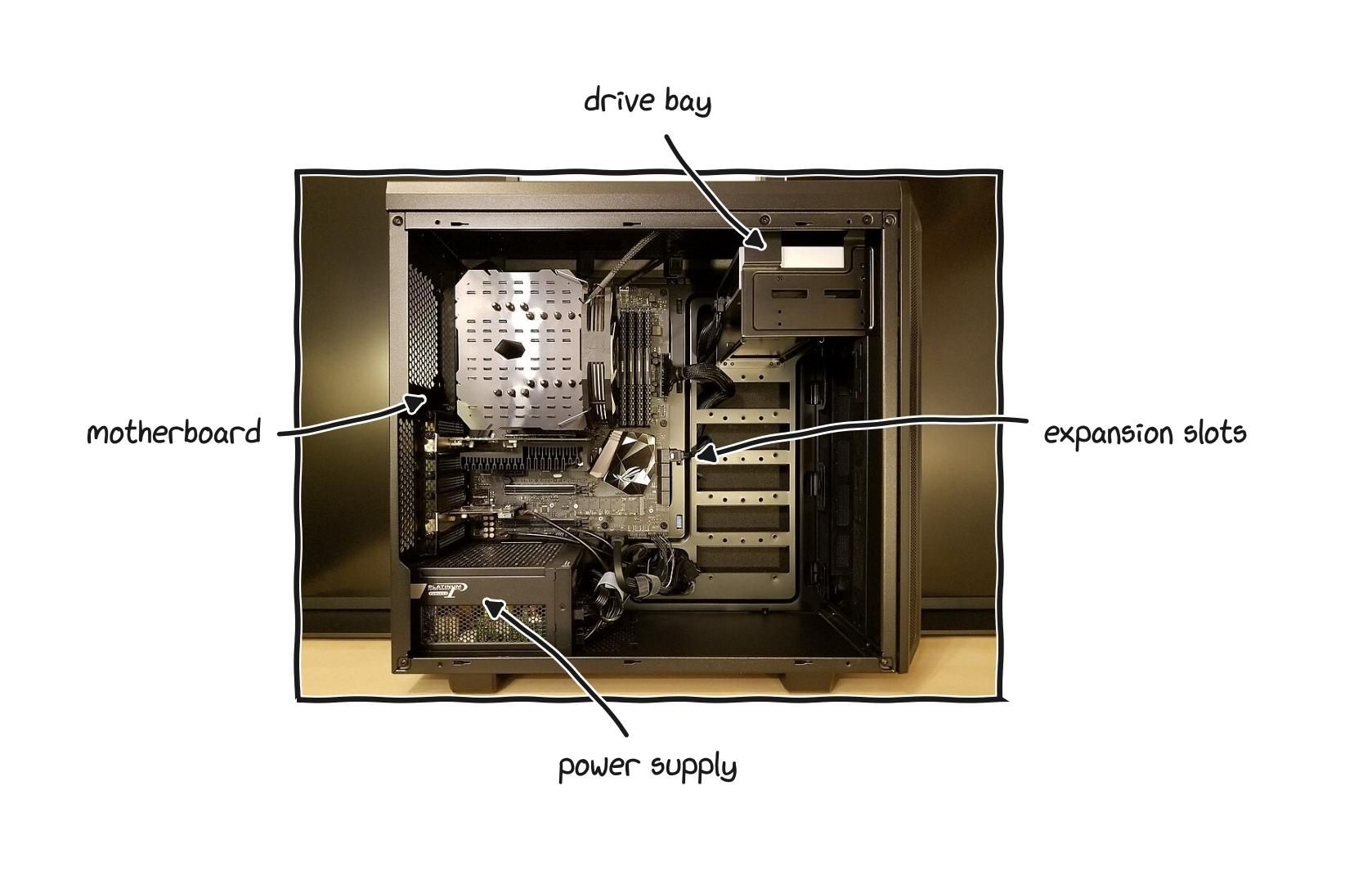
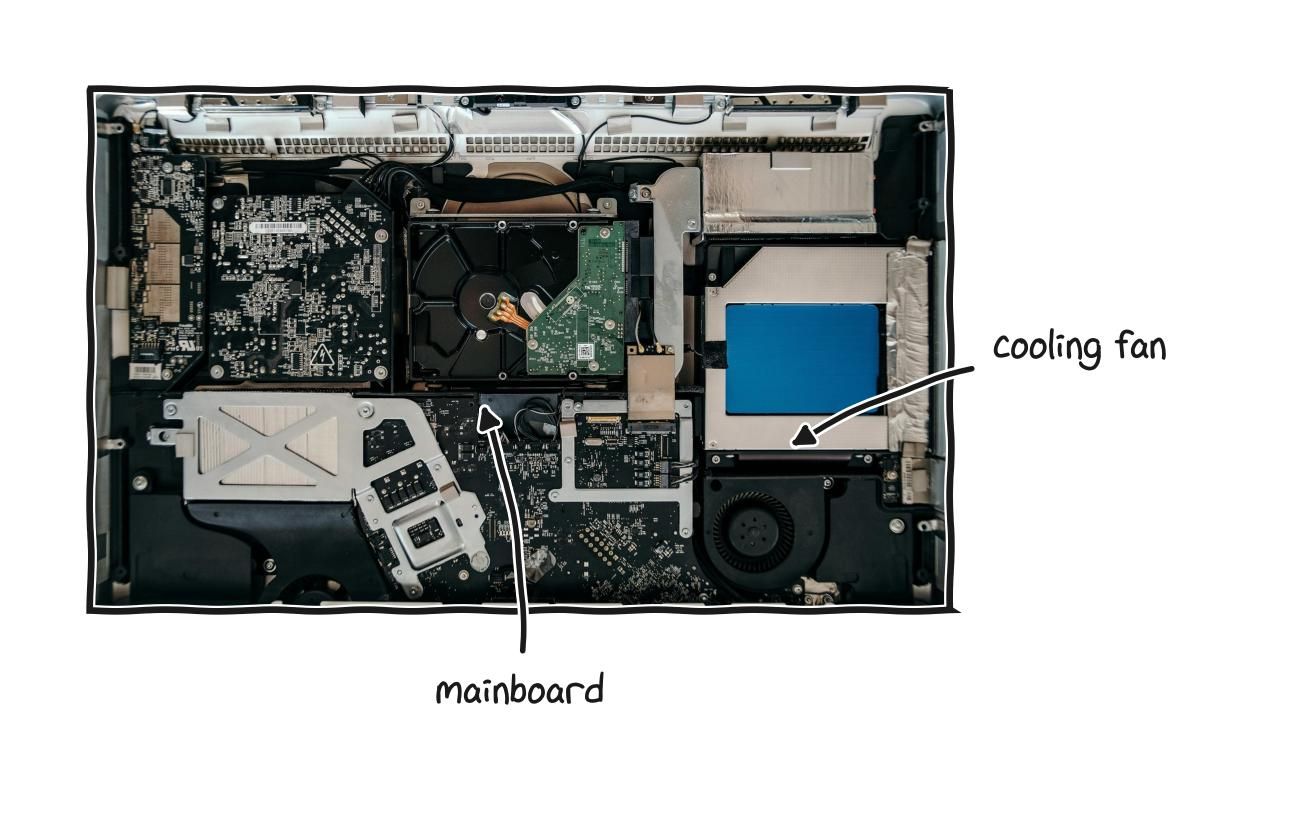
A desktop is simplest version of a computer: a few parts in a box that opens, with each one able to be swapped.
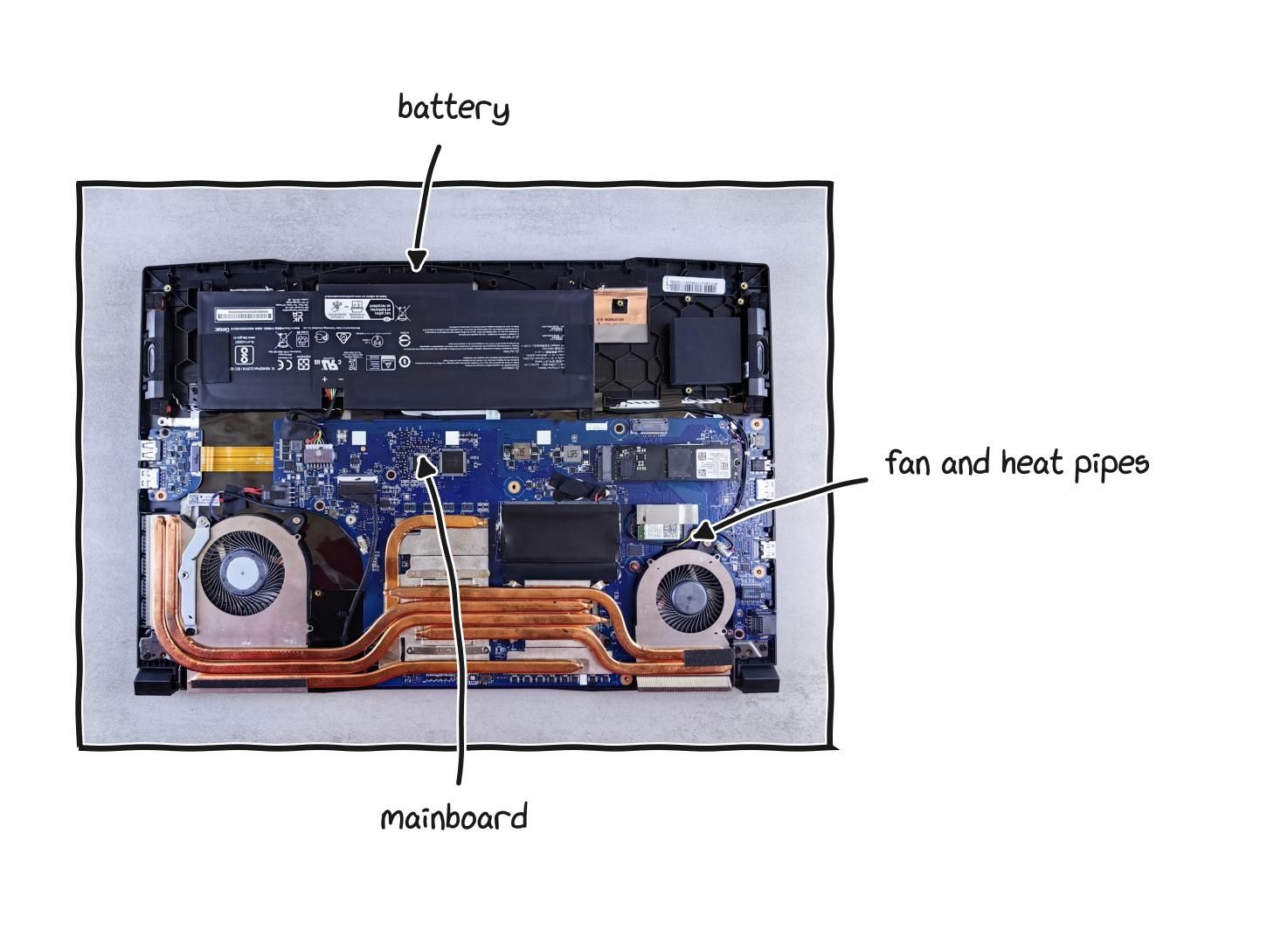
A laptop holds the same parts behind a sealed shell, and opening one is made deliberately harder.
The second is sealing consumable parts. A battery is guaranteed to wear out, every one does, after a few hundred full charge cycles, usually within a few years. In a well built machine, replacing it is a small job. In a sealed design the battery is glued in place behind components that were never meant to be removed, so a worn battery, which is a normal and expected failure, can end the working life of a computer that is otherwise completely fine.
The third is making the device physically hard to open, with uncommon screw shapes, screws hidden under glued rubber feet, or cases meant to be pried rather than unscrewed. None of this is necessary for the product to work. It exists to discourage you from going inside.
The fourth is locking the software underneath. Firmware is the low level software built into a device that starts everything up before the main operating system loads. When firmware is locked, you cannot change basic settings or install a different operating system, even though the hardware is fully capable of running one.
The fifth, and the newest, is parts pairing. A replacement part, even a genuine one made by the same manufacturer, is registered to the specific machine it ships in. When a different unit of that same part is installed, the device checks whether the manufacturer’s system has authorized that exact pairing, and if it has not, the part is rejected or runs in a degraded state. A screen, a battery, a camera, or a fingerprint reader can be tied electronically to one machine. The part is physically correct and electrically sound, and the software refuses it anyway.
None of these on its own is a scandal. Together they describe a slow shift of control away from the person who paid for the device and toward the company that made it. The rest of this guide is partly about understanding the machine well enough to see exactly where that control lives, because control lives in specific physical and software layers, and you cannot evaluate what you cannot name.
part 2: the processor
The processor, or CPU, short for Central Processing Unit, is where programs actually run. It carries out the instructions that make up every program you run, and it is the component that most defines how fast a computer feels.
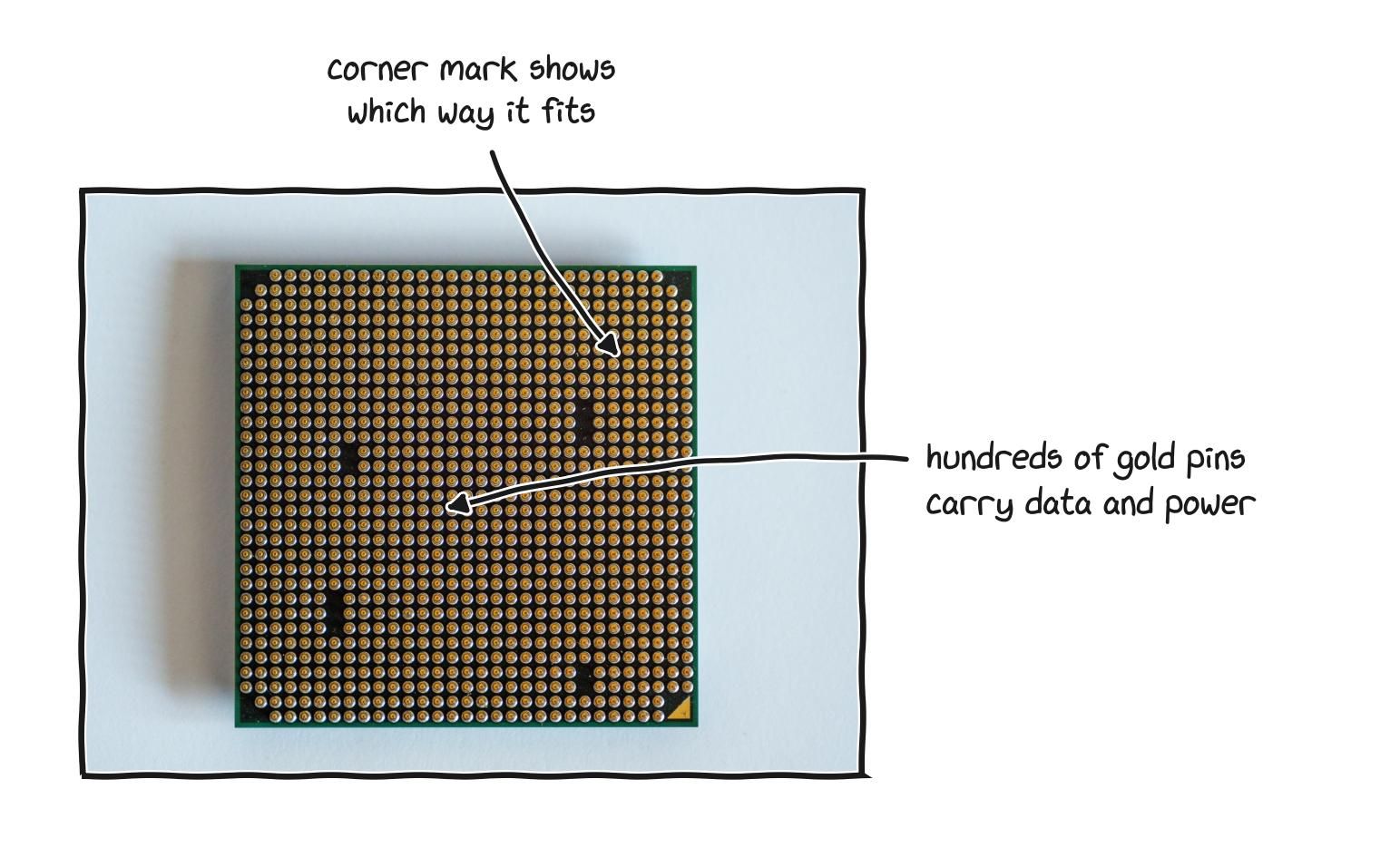
A processor is a small slab of silicon under a metal lid, resting on a dense grid of contacts.
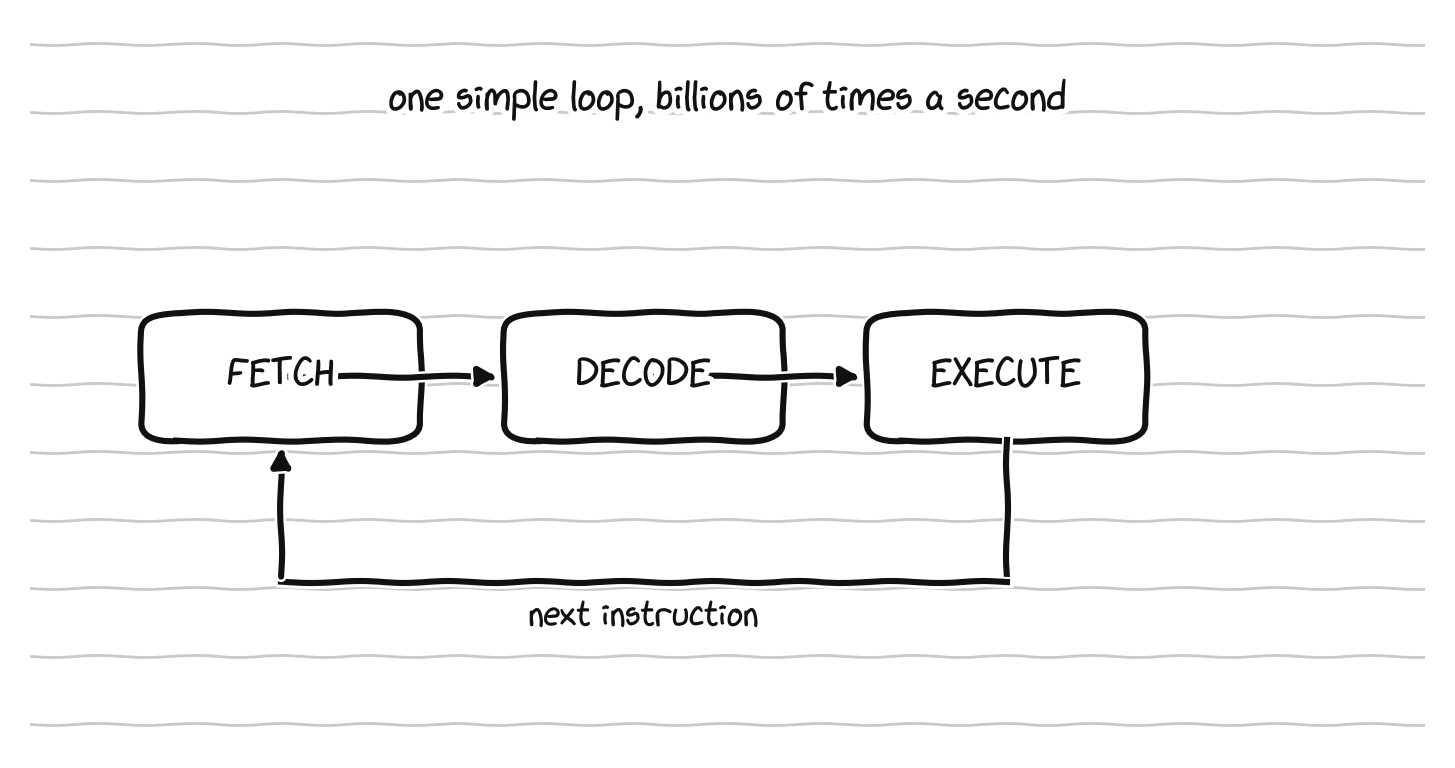
A processor does one simple loop, billions of times a second.
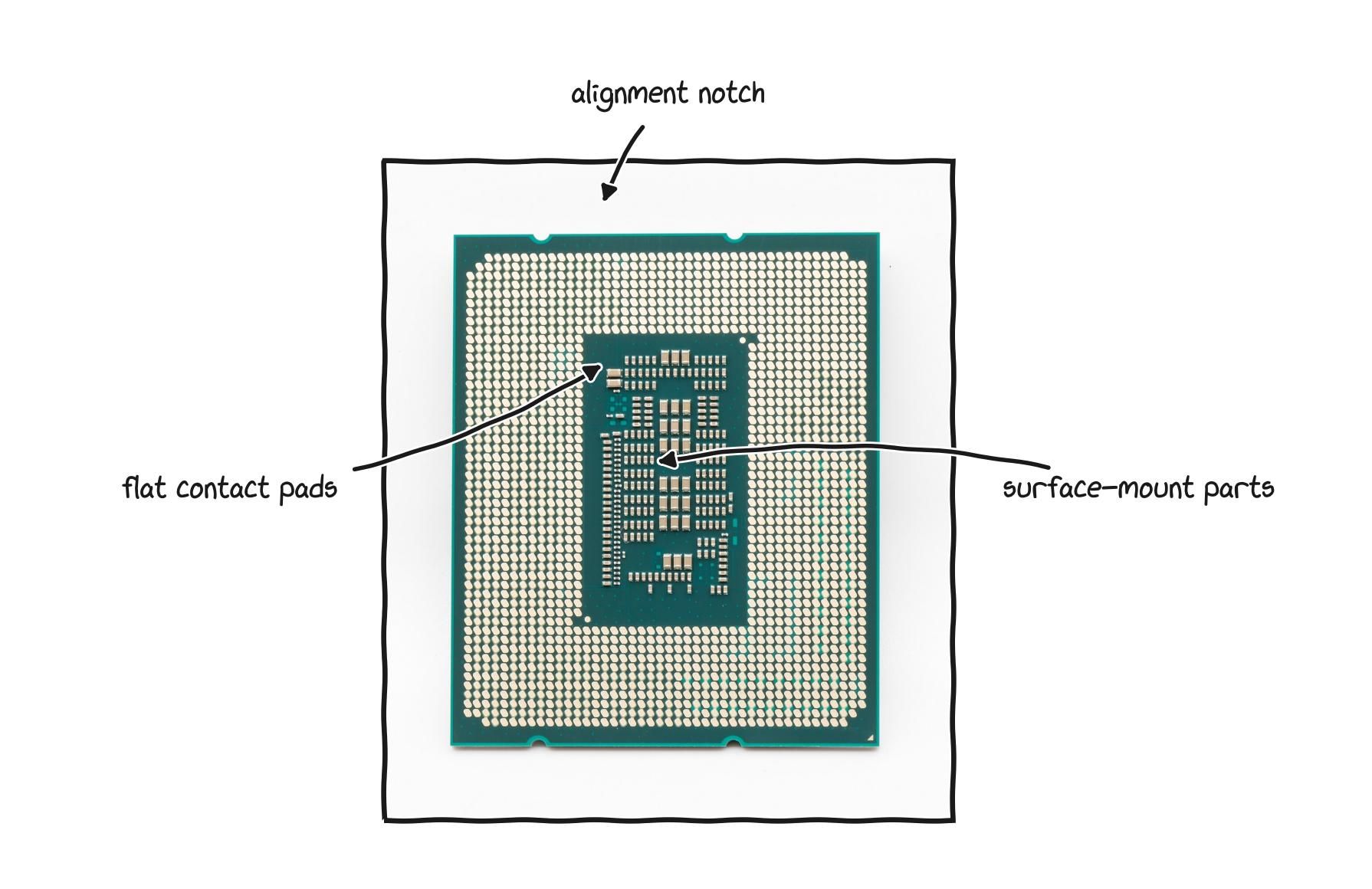
A modern desktop processor seen from below, its flat pads lining up with pins in the socket.
Strip away the marketing and a CPU does one simple thing, over and over, billions of times every second. It fetches an instruction from memory, decodes what that instruction means, executes it, and moves to the next one. Fetch, decode, execute, repeat. A running program is just a very long list of these tiny instructions, things like “add these two numbers,” “move this value over there,” or “if this is true, jump to that point in the list.” The processor is not clever in any dramatic sense. It is breathtakingly fast at a fundamentally simple loop, and a computer projects intelligence mostly through speed, not depth.
Every processor understands a specific, fixed set of instructions, a kind of vocabulary, and that vocabulary is called the instruction set architecture, often shortened to ISA. The ISA matters a great deal, because software has to be translated, or compiled, into the exact vocabulary of the processor it will run on. A program built for one instruction set will not simply run on a processor that speaks a different one.
Two instruction sets dominate laptops and desktops. The first is x86, which has run personal computers for more than forty years and is controlled in practice by exactly two companies, Intel and AMD, which hold the patents between them. The second is ARM, which began in small battery powered devices where using very little power mattered most, and which has now moved firmly into laptops, most visibly in the chips Apple designs for its own machines. ARM works on a completely different model from x86, and that difference shapes who controls the industry, so it gets its own treatment later. For now, hold the distinction in mind: x86 and ARM are two different languages, and which one a chip speaks shapes what software it can run.
Several numbers describe a CPU, and each one is simpler than it sounds.
Cores. A core is, in effect, a complete worker inside the processor. A chip with more cores has more workers, so it can do more genuinely at the same time. One core is one cook in a kitchen, four cores is four cooks. For light tasks one busy cook is enough, but for heavy work like compiling code, editing video, or running data analysis, more cooks finish the meal much faster. Common laptop CPUs today have anywhere from four to sixteen cores.
Threads. A thread is a single stream of work. Many cores can handle two threads at once, which lets each core juggle two tasks and stay busy instead of idling, so an eight core processor often handles sixteen threads.
Clock speed. This is how many basic operations a core performs each second, measured in gigahertz. A higher clock speed means each core works faster, but the number only sensibly compares chips from the same family, because a higher clock on an older design can still lose to a lower clock on a newer one.
Cache. Cache is a very small, very fast pocket of memory built directly into the processor, holding the data the chip is most likely to need next so it does not have to reach out to slower main memory. More cache generally means a smoother, faster processor. You will see it listed as L1, L2, and L3, which are simply levels, with L1 the smallest and fastest and L3 the largest and slowest. Cache is the first hint of an idea that turns out to govern the whole machine, which is that memory comes in a hierarchy of speeds, and the processor spends a lot of its design effort hiding the slow layers behind the fast ones.
Generation. Processors come in generations, released roughly once a year, and a newer generation can outperform an older one even at similar core counts and clock speeds, because the underlying design improved. Two real things change between generations. First, the transistors, the microscopic switches a chip is built from, get smaller, which is what those nanometer figures refer to, so more of them fit in the same space and each uses less power. Second, the design itself gets smarter, doing more useful work in each single tick of the clock. That second idea has a name, instructions per clock, and it is the reason a newer chip can beat an older one even when the older one has a higher clock speed number. The practical lesson is to always check how old a processor design is, because buying a brand new machine built around a chip design that is several years old is a common and avoidable mistake.
Two more details matter for understanding modern chips. If you look closely at a recent laptop processor you may see a core count described as something like “four plus eight.” Modern chips often combine two kinds of core. Performance cores are large and fast, built for heavy work, while efficiency cores are small and frugal, built for light background tasks, and the machine sends easy jobs to the efficiency cores to save battery and wakes the hungry performance cores only when real work arrives. And recent laptop chips often include a third kind of processor alongside the CPU and the graphics, called a neural processing unit, or NPU, a small specialist built to run AI tasks efficiently and directly on the machine without sending data off to the cloud. Its capability is sometimes quoted in a unit called TOPS, for trillions of operations per second. The NPU is a minor factor for most buyers today, but it is showing up in more machines each year.
One fact surprises many people: the identical processor can perform noticeably differently in two different laptops. A chip generates heat when it works hard, and a laptop is a thin, cramped space with limited room to move that heat away. When the chip gets too hot it deliberately slows itself down to cool off, a behavior called thermal throttling. A laptop with good cooling lets the chip run hard for longer before this happens, while one with poor cooling forces it to back off quickly. This is why you should judge a machine by reviews and benchmarks of the actual model rather than by the processor name alone. The name tells you which engine is inside. It does not tell you how well that engine was installed.
A processor name looks intimidating but is just a code. The brand and family come first, a number like 3, 5, 7, or 9 indicates the tier within that family, and the longer model number encodes the generation and the specific variant, with letters at the end hinting at things like an energy efficient chip for thin laptops. You do not need to memorize the letters. You only need to know that the name is decodable, and that the fastest way to understand any chip is to type its full name into a search engine along with the word “benchmark,” because independent benchmark sites test processors and give them a single comparable score. Comparing two benchmark numbers directly is the honest shortcut, as long as you match the exact model names.
part 3: memory, and the wall that now defines ai
Memory, or RAM, short for Random Access Memory, is the machine’s short term working space. Confusing it with storage is the most common misunderstanding in computing, so it is worth getting right at the start.
Picture working at a desk. Your storage is the filing cabinet, where everything you own is kept safely, even overnight. Your RAM is the desk surface, which only holds what you are actively working on right now. When you open a program or a file, the computer pulls it from the filing cabinet and lays it out on the desk so it can be worked on quickly, and a bigger desk lets you keep more things open at once. Two consequences follow. RAM is much faster than storage but much smaller, just as a desk is easier to reach across than a filing cabinet but holds far less. And RAM is volatile, meaning it is cleared every time the machine powers off, just as a desk gets cleared at the end of the day, so anything you want to keep has to be saved to storage.
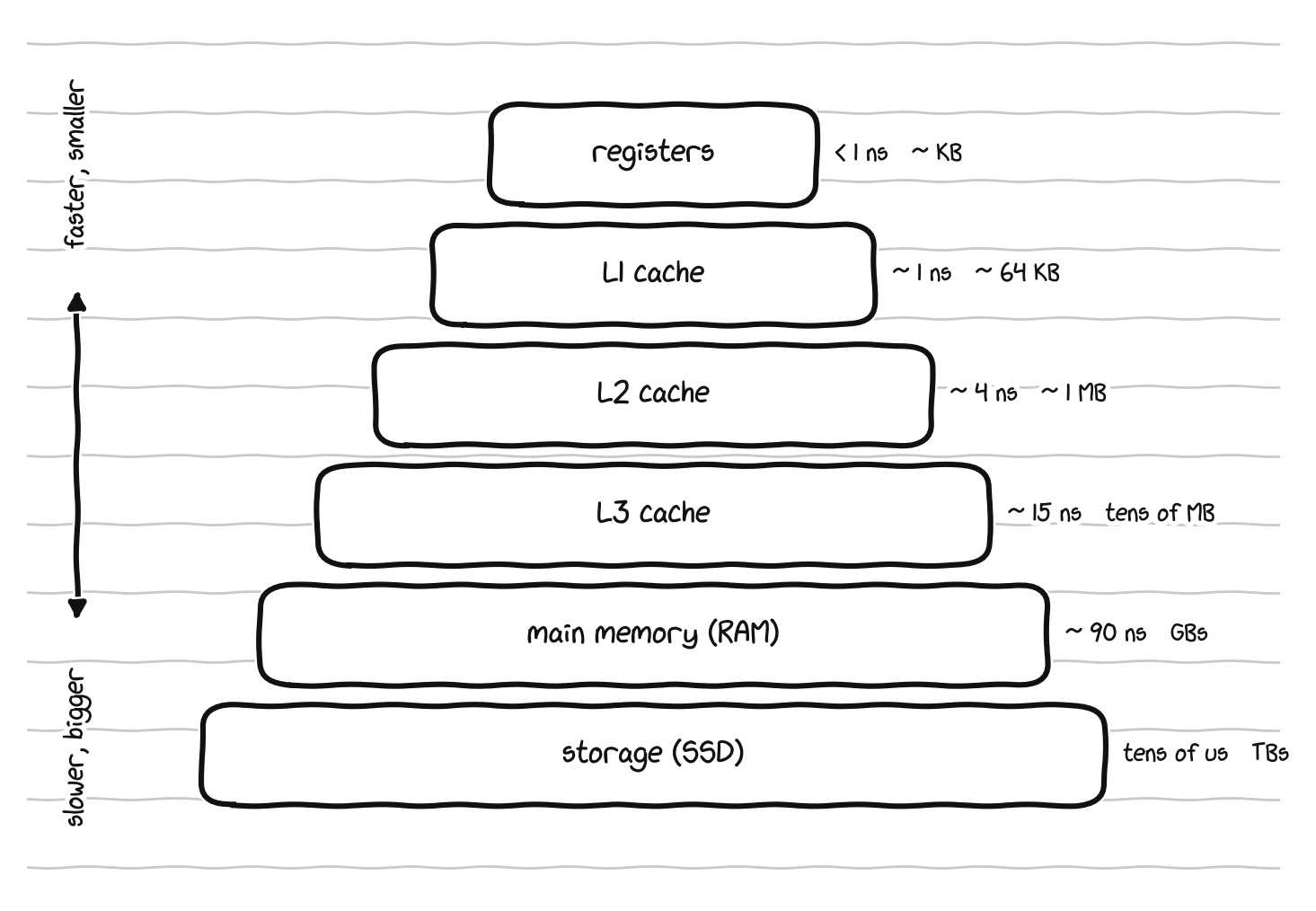
The memory hierarchy, where each step down is bigger but slower by a wide margin.
For everyday use the practical question about RAM is how much you need, which is about how many things you can comfortably do at once. As a rough guide today, eight gigabytes is the bare minimum and will feel tight, sixteen is the comfortable middle for most people, and thirty two is for heavy multitasking, large data files, virtual machines, serious creative work, or simply wanting the machine to feel roomy for years. If you work with large datasets or run demanding software, lean toward thirty two. And the ownership question from Part 1 applies directly here: soldered memory is fixed to the board forever, so if a machine has it you should buy generously on day one, while socketed memory sits in a slot you can swap or add to later, so you can start smaller. The two common removable forms are SODIMM, the long standing laptop memory stick, and LPCAMM2, a newer removable module that is faster and more power efficient, and both can be upgraded while soldered memory cannot.
That is the buyer’s version. The deeper story involves memory’s role in modern AI, which requires understanding two things: what actually changed in the latest generation of RAM, and the larger problem called the memory wall.
Start with DDR5, the latest generation. RAM comes in numbered standards, DDR4 then DDR5, with DDR6 on the horizon, where DDR stands for Double Data Rate. DDR5 is not just a faster DDR4. It changed the architecture. A DDR4 module presents a single 64 bit channel to the processor, while a DDR5 module splits that into two independent 32 bit subchannels, each with its own access logic, which lets the memory controller interleave requests far more efficiently. DDR5 also added error correction logic built into each module, a first for consumer memory, doubled the number of bank groups from four to eight so more requests can be in flight at once, dropped the operating voltage from 1.2 to 1.1 volts, and moved power regulation onto the module itself for cleaner signals. The headline result is bandwidth. A dual channel DDR5-6400 configuration delivers roughly 100 gigabytes per second, against roughly 50 for dual channel DDR4-3200, and enthusiast kits push higher. The reason the industry made this jump is that core counts kept climbing while DDR4 bandwidth had stopped scaling, so the processors were starving for data. That phrase, starving for data, captures the memory wall problem.
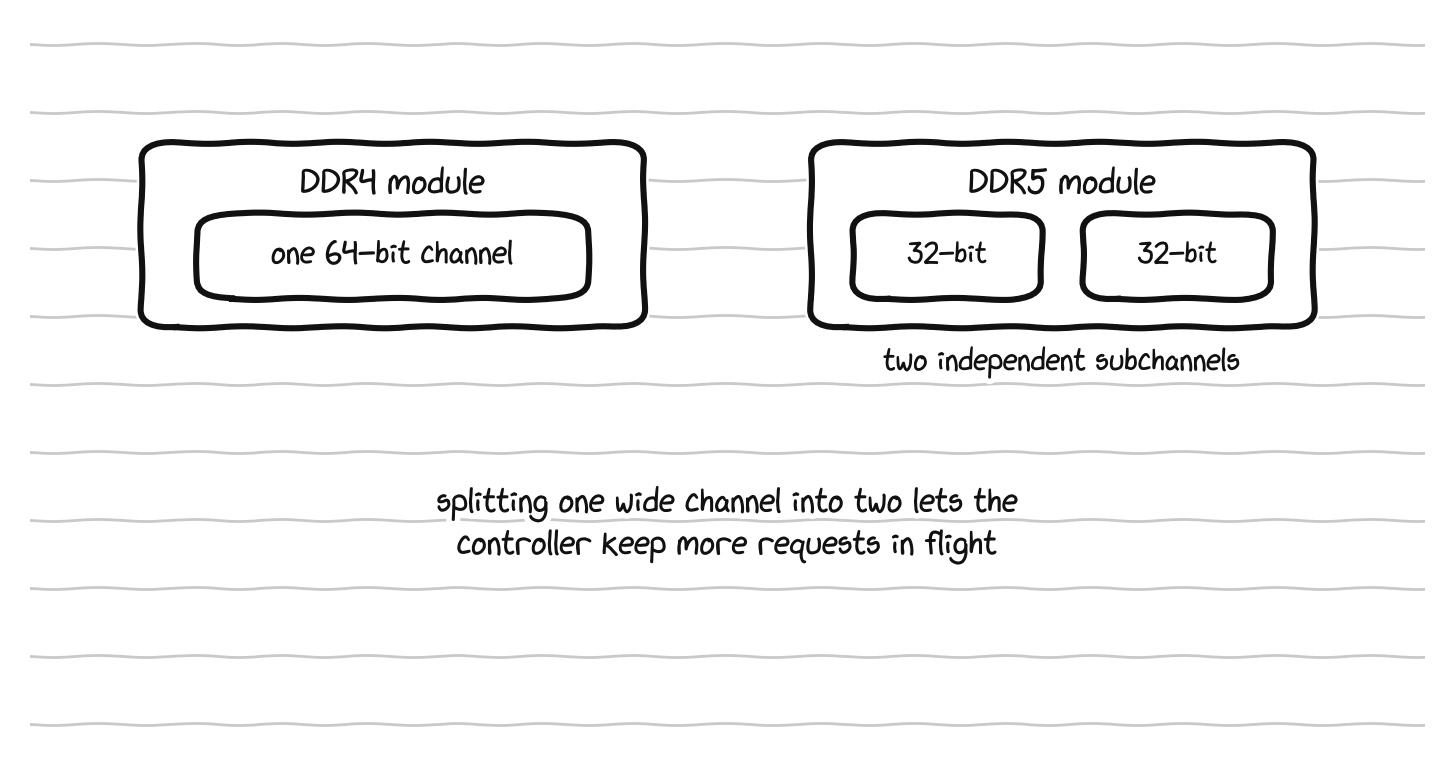
DDR4 presents one 64-bit channel, while DDR5 splits the module into two independent 32-bit subchannels.

A dual-channel DDR5-6400 setup reaches roughly 100 GB/s.
Here is the wall itself. For decades, the speed of processors grew much faster than the speed of memory. Compute roughly doubled on a predictable schedule, but the bandwidth to feed it with data grew far more slowly. The gap compounded year after year, until we reached a point where, for a large class of important workloads, the processor is not the bottleneck at all. It sits idle, waiting for data to arrive from memory. The memory wall is the name for that situation, where the limiting factor is no longer how fast you can compute but how fast you can move data to the place where the computing happens.
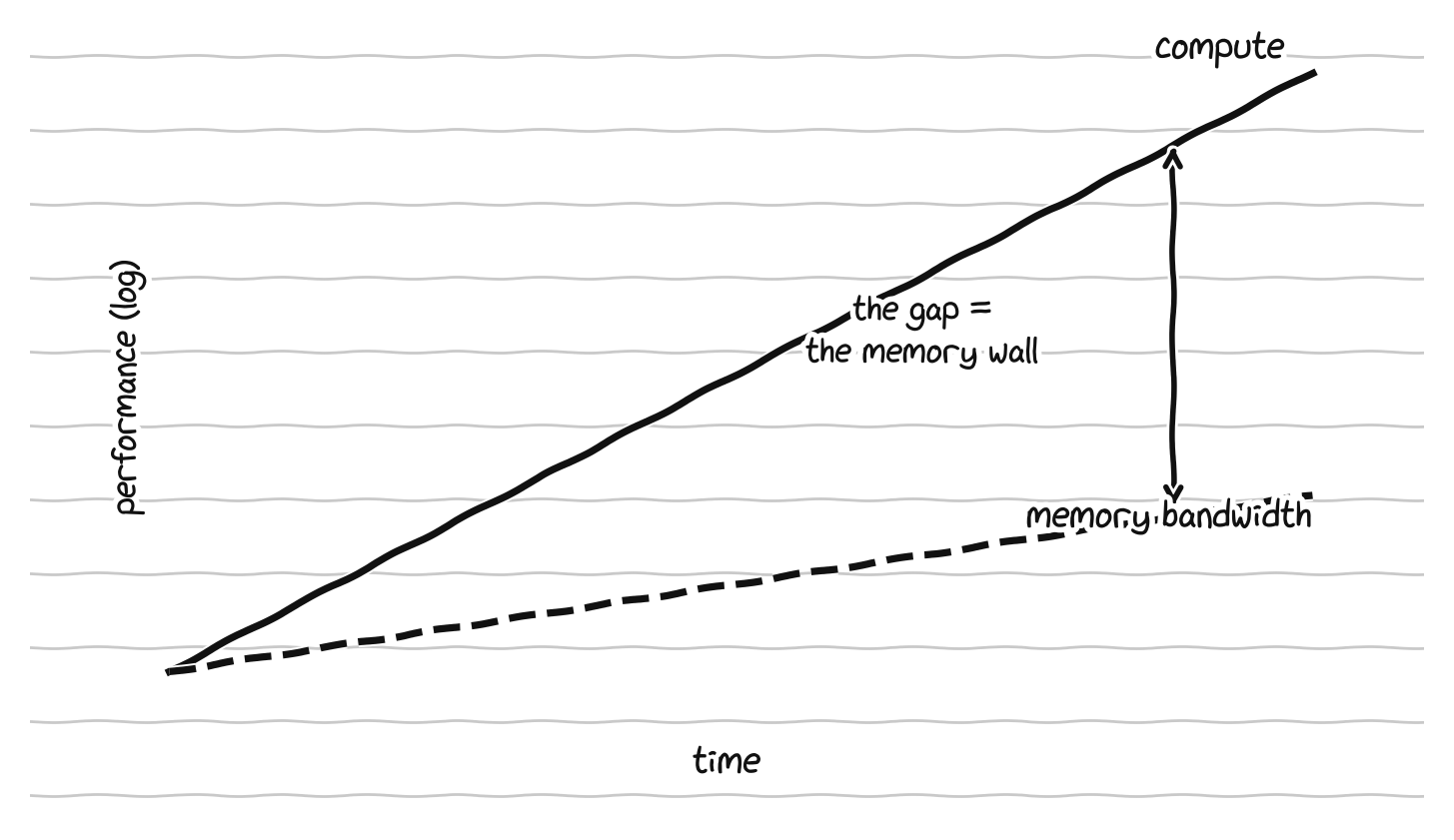
Compute has grown far faster than memory bandwidth, and that widening gap is the memory wall.
There is a clean way to think about whether any given task is on the wrong side of this wall, called the roofline model, and the key quantity is arithmetic intensity, which is simply the number of useful calculations a task performs for every byte of data it has to move from memory. A task with high arithmetic intensity does a lot of math on each piece of data and is limited by raw compute, so it is called compute bound. A task with low arithmetic intensity does only a little math on each piece of data before needing the next piece, so it spends most of its time waiting on memory, and it is called memory bound. The same chip can be lightning fast on one and crawl on the other, entirely depending on which side of the roofline the work falls.


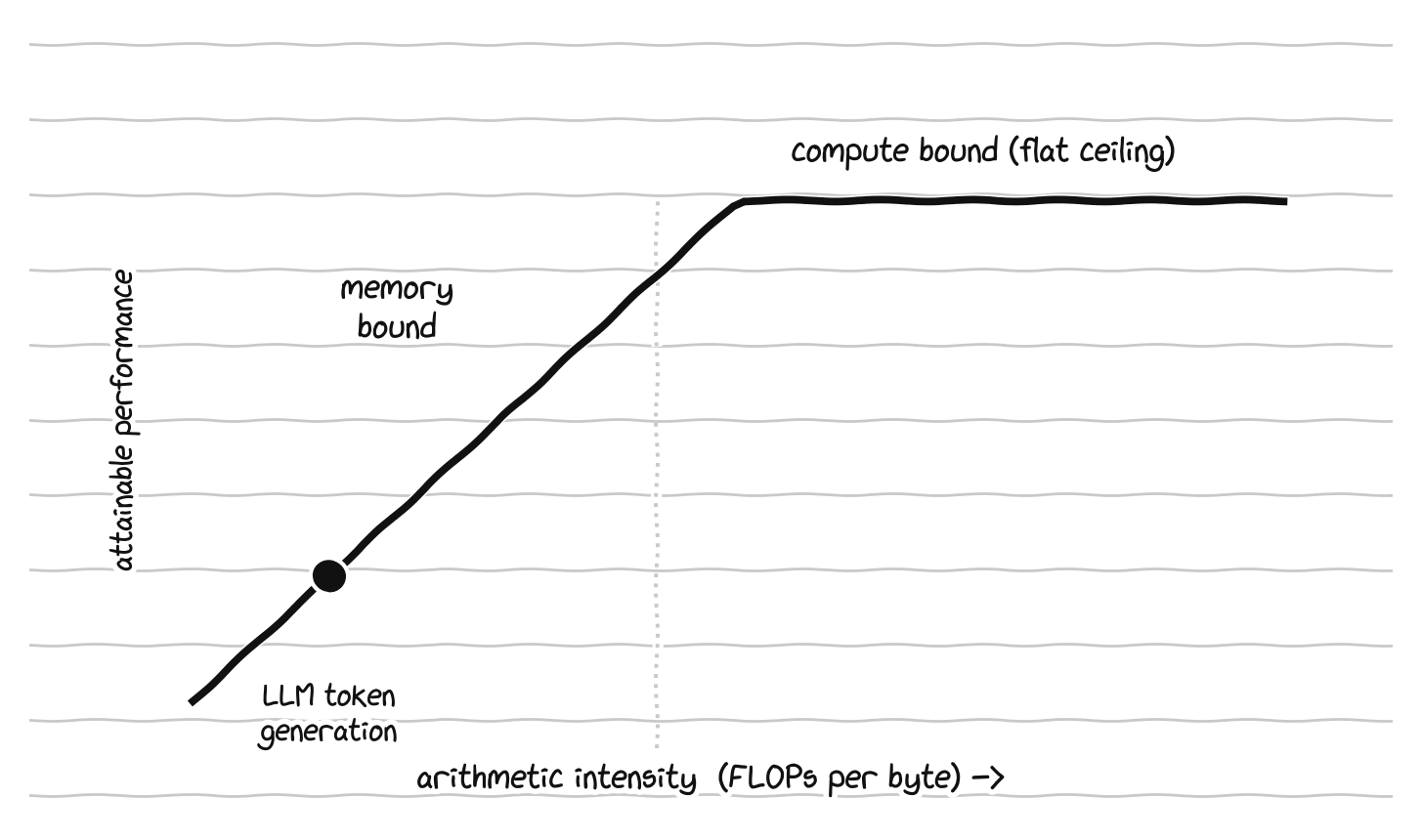
On the roofline, a task is memory-bound below the ridge and compute-bound above it, where language-model text generation sits.
This is why AI accelerators use a special kind of memory called HBM, for High Bandwidth Memory, which stacks memory chips vertically right next to the processor and connects them with an extremely wide interface, trading capacity and cost for raw bandwidth. The current production generation, HBM3E, delivers somewhere around 1.2 terabytes per second per stack, with up to 36 to 48 gigabytes of capacity per stack, and it is the baseline for the AI accelerators shipping in 2026. The next generation, HBM4, was standardized in late 2024 and is reaching production in 2026 on chips like NVIDIA’s Rubin and AMD’s MI400 line. It doubles the interface width to 2048 bits, pushes past 2 terabytes per second per stack, and reaches 64 gigabytes per stack, with the most advanced configurations climbing higher. To put the contrast in perspective, the DDR5 in a desktop costs a few dollars per gigabyte and moves around 100 gigabytes per second, while HBM costs something like fifteen to twenty dollars per gigabyte, several times more, and a single high end accelerator moves multiple terabytes per second. You are paying a large premium for bandwidth, because bandwidth is what is scarce.
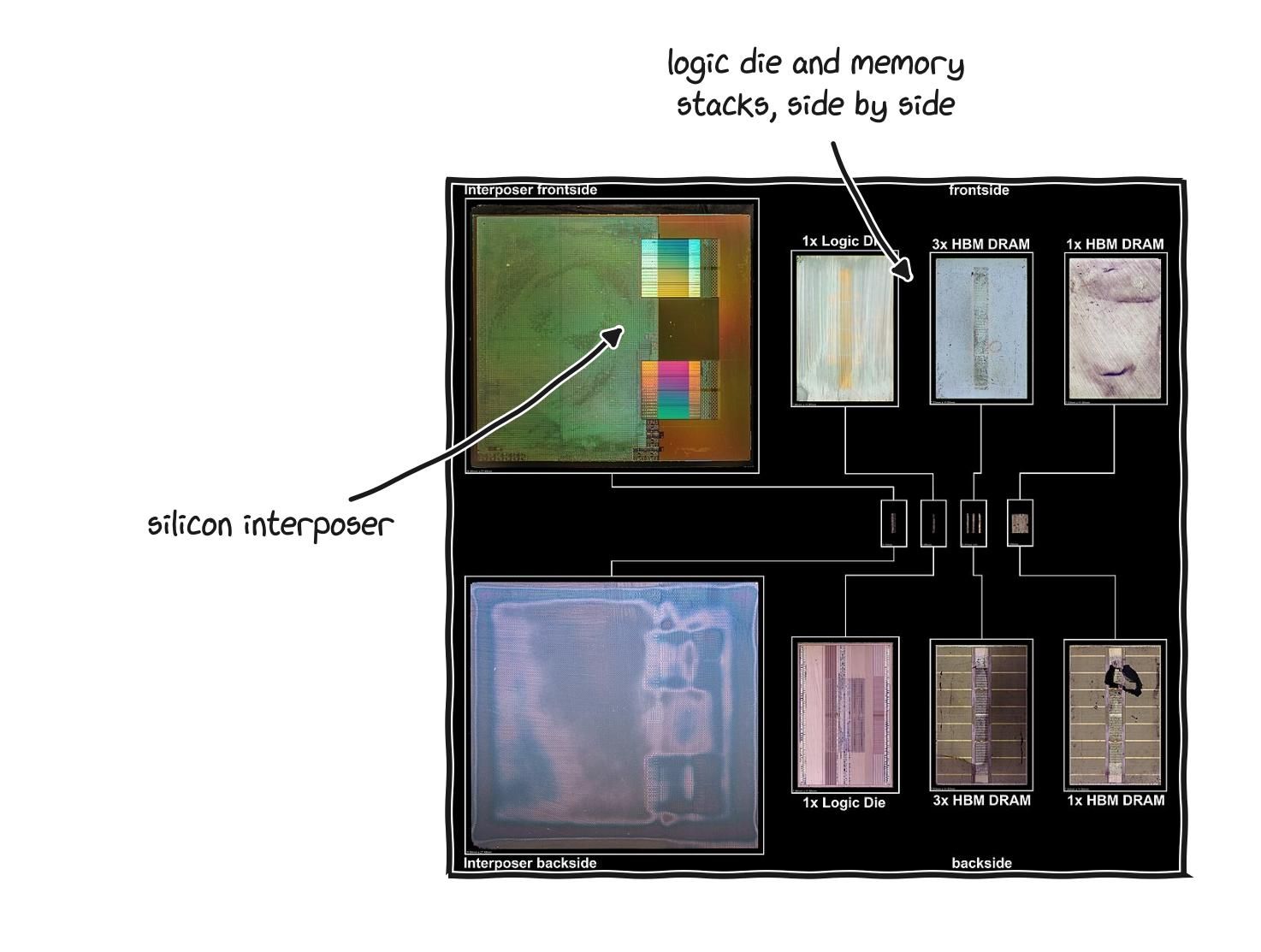
Real high-bandwidth memory: stacks of DRAM sharing the processor’s package, joined by an interposer.
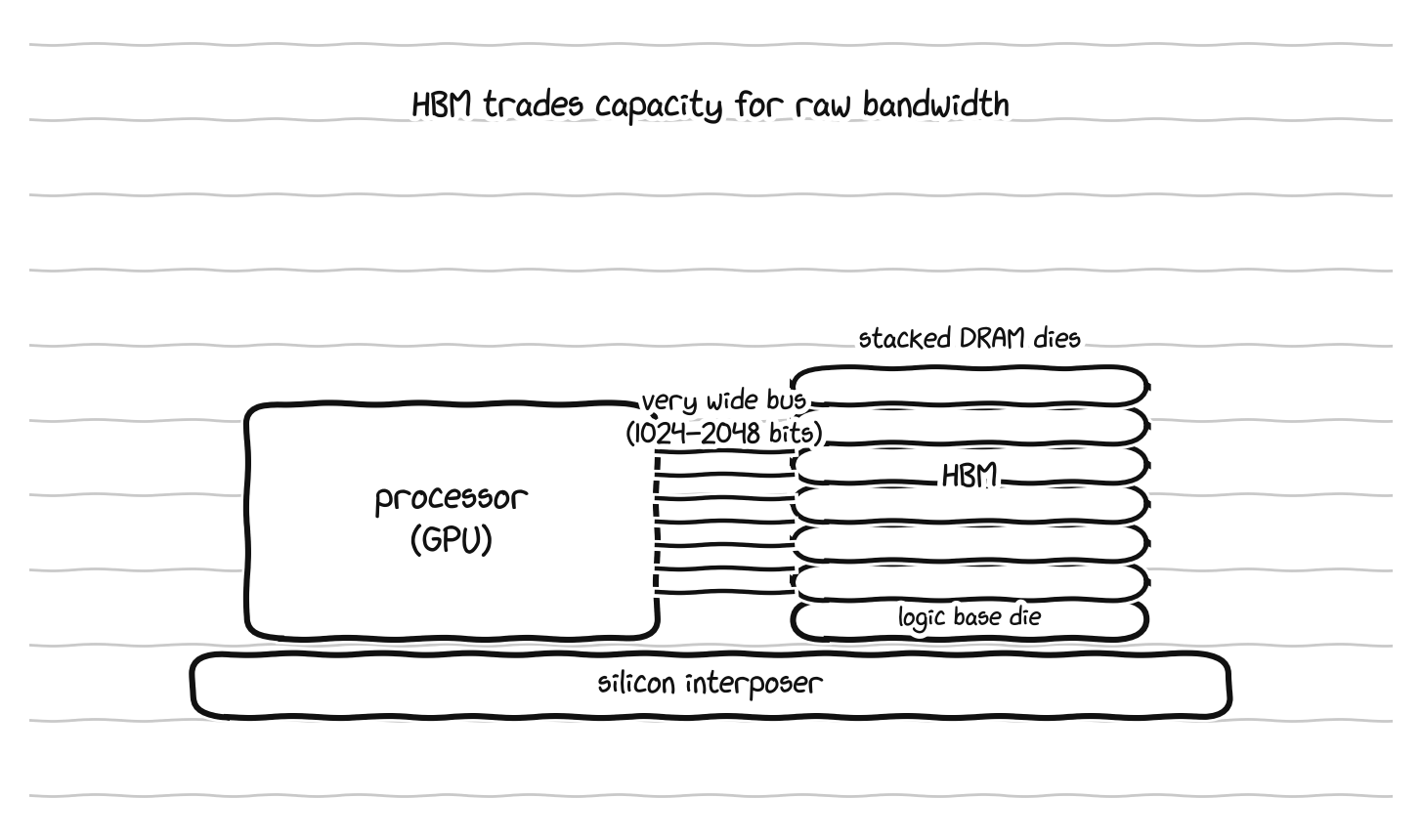
Why is bandwidth the thing that is scarce for AI specifically? Because of how a large language model generates text. To produce each new word, the model reads its entire set of weights, which can be hundreds of gigabytes, out of memory once, runs a comparatively small amount of math on them, and moves on to the next word. That is a memory bound workload, low arithmetic intensity, almost entirely limited by how fast the weights can be streamed out of memory. This is why moving from one generation of memory to the next raises how many words per second a given chip can produce, with almost nothing else changing. The memory, not the compute, sets the ceiling. It is also why there is now a global shortage: high bandwidth memory has been sold out through 2026, a single company holds the majority of the supply, and the squeeze has been severe enough that manufacturers cut ordinary gaming graphics card production to redirect capacity. Memory, not processors, is the AI buildout’s most contested resource right now.
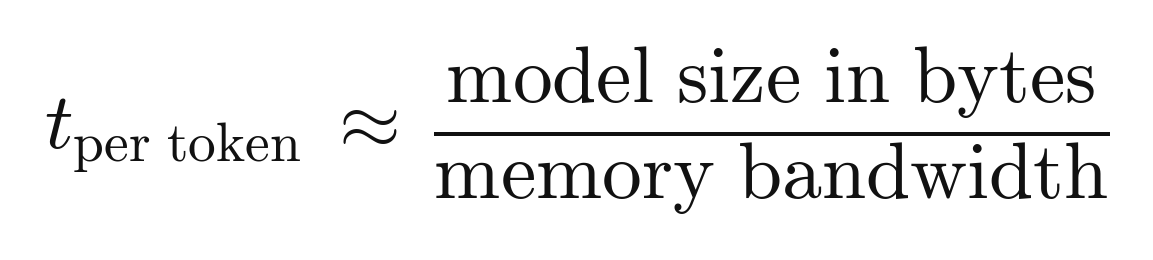
To a first approximation, the time to produce one token is the model size divided by the memory bandwidth.
There is one more place this shows up that connects directly to how these systems remember anything, which is the KV cache. When a language model processes a long conversation, it stores an intermediate representation of everything it has already read so it does not have to recompute it for every new word. That store is the KV cache, and it grows with the length of the context, which is why very long contexts are expensive: not because the math gets harder, but because the cache has to live in fast memory, and fast memory is the scarce, expensive thing. The whole reason “context window” is a meaningful limit, rather than a number someone could trivially raise, is that it is fundamentally a memory budget. If you want to understand why AI systems feel forgetful, the memory hierarchy is where the answer lives.
That is why memory gets the long treatment. In 2026, for the workloads driving most hardware investment, the binding constraint is memory bandwidth, and a large share of what the frontier of hardware design is doing is a response to that.
part 4: storage
Storage is the machine’s permanent memory, the filing cabinet from the desk analogy. It keeps the operating system, programs, documents, and everything else, including while the machine is switched off.
There are two technologies. A hard disk drive, or HDD, stores data on spinning magnetic platters read by a moving arm. It is the older technology, cheaper per gigabyte but slow, heavier, and fragile because it has moving parts. A solid state drive, or SSD, stores data in flash memory chips with no moving parts, which makes it dramatically faster, lighter, more durable, and silent. Any computer you buy today should have an SSD, and it is the main reason modern machines feel instantly responsive while a machine with an old HDD feels sluggish no matter how good its other parts are.
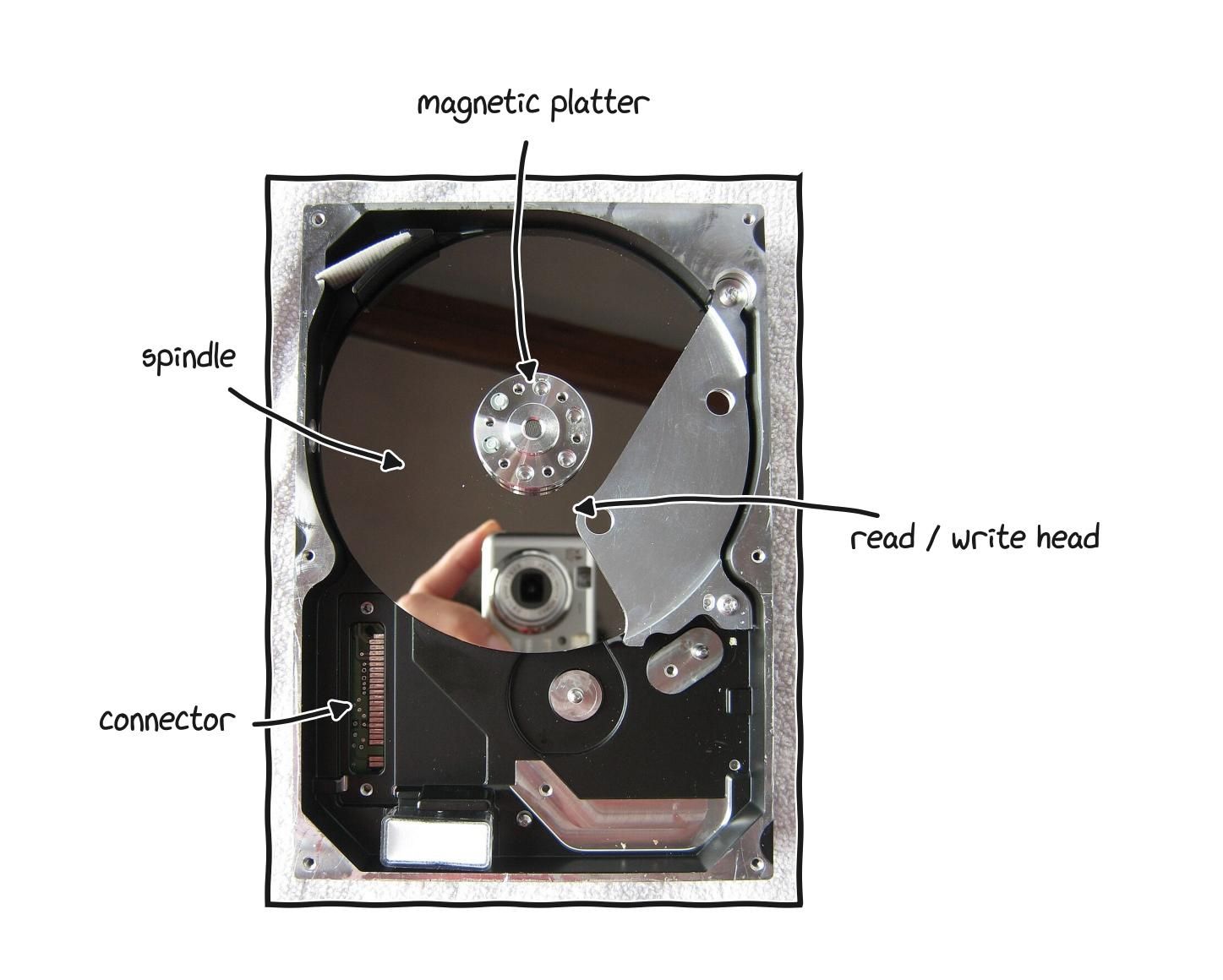
Inside a hard drive, a spinning magnetic platter and the arm that reads it, whose moving parts set the speed limit.
Within SSDs there are faster and slower kinds, and the words sound more complicated than they are. SATA is the older, slower connection standard. NVMe is the newer, much faster one. M.2 describes the physical shape, a small stick that plugs directly into the board. Most modern machines use an M.2 NVMe SSD, which is the fast modern combination, and NVMe drives come in generations, with newer ones being faster. Capacity is measured in gigabytes and terabytes, where a terabyte is roughly a thousand gigabytes, and as a rough guide today 256 gigabytes is small and fills quickly, 512 is a sensible middle, and a terabyte is comfortable. Unlike soldered memory, storage on many machines can be replaced or enlarged later, so check whether the storage slot is accessible.
For anyone doing machine learning, storage matters in a specific way that buyers usually ignore. Training a model means streaming enormous datasets off storage and into memory continuously, and saving model checkpoints, which can be tens or hundreds of gigabytes, repeatedly during a run. If the storage cannot feed the rest of the system fast enough, the expensive processor sits idle waiting, which is the memory wall reappearing one level down. This is why serious training setups care about storage bandwidth and parallel access, and why the file system abstraction that desktop operating systems were built around, with its emphasis on lots of small files, turns out to be poorly matched to the bulk streaming that AI work needs. The hierarchy of speeds, from the tiny fast cache inside the processor down through RAM and out to storage, is the structure that every high performance system is organized around, and where the data sits at each moment is often the difference between a fast program and a slow one.
part 5: the graphics processor, and the engine of ai
The graphics processor, or GPU, short for Graphics Processing Unit, is a specialist built for tasks that can be split into thousands of small, similar calculations done at the same time. Drawing every pixel on a screen is exactly that kind of task, which is why graphics was its original job, but the same talent turned out to underpin the AI era.
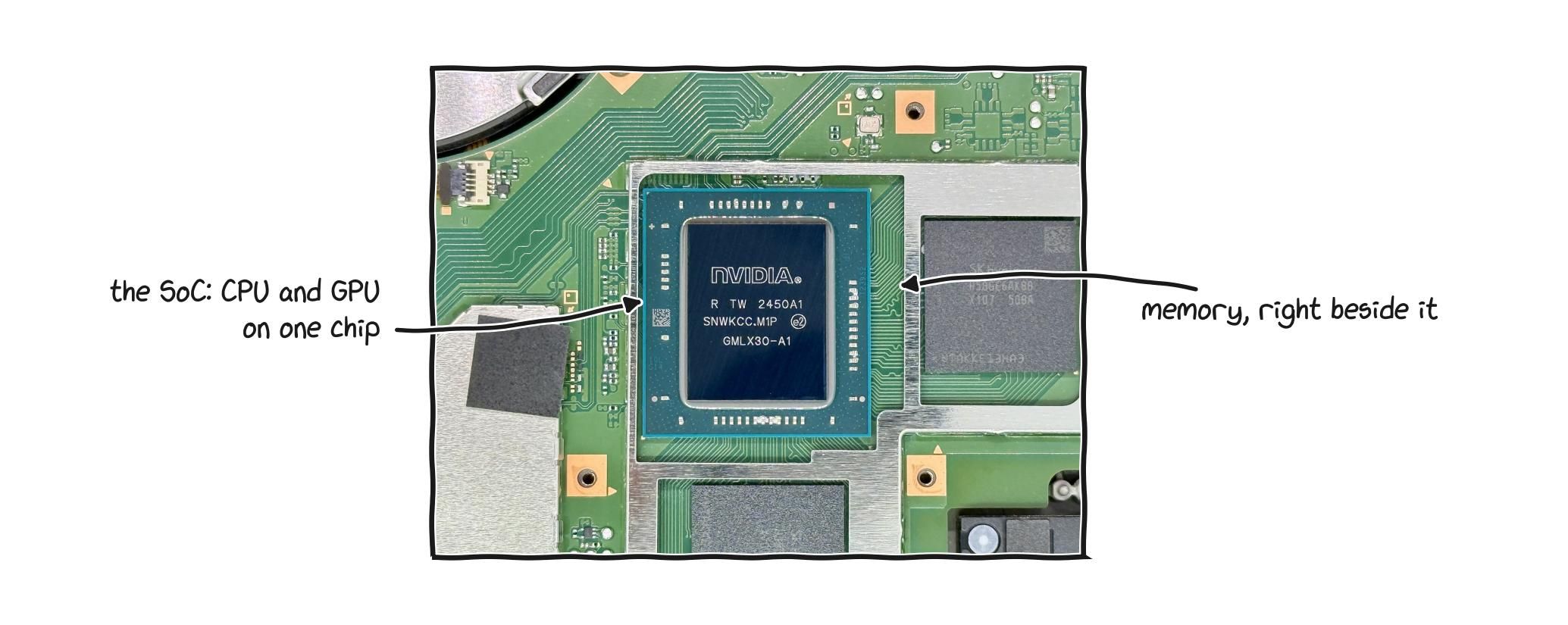
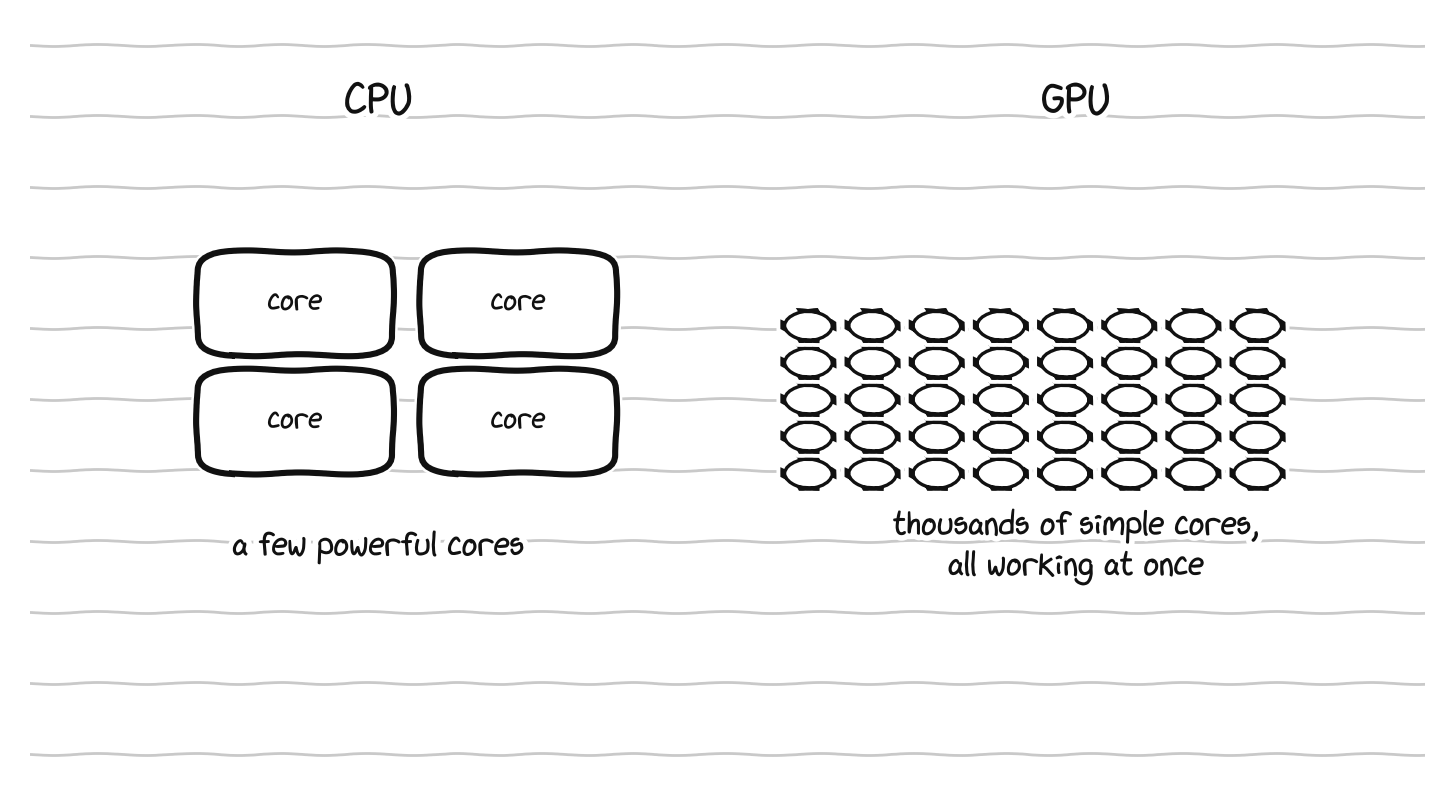
CPU and GPU architectures (top) and a game console system on a chip integrating processing, graphics, and memory (bottom).
To see why, compare it to the CPU. A CPU has a small number of large, powerful, flexible cores, and it is brilliant at complicated, varied work that has to happen in a particular order. A GPU is the opposite, with thousands of small, simple cores, and it is brilliant at doing the same simple operation on enormous amounts of data all at once. A CPU is a few brilliant professors, each able to work through hard and varied problems. A GPU is a stadium full of students, each able to do only basic arithmetic, but all working in the very same moment. For a problem that can be broken into millions of identical small sums, the stadium finishes overwhelmingly faster, and for a problem that must be solved one careful step at a time, the professors win. A complete machine needs both kinds of mind.
For everyday buyers there are two kinds of GPU. Integrated graphics are built into the main CPU and share its resources, which is fine for everyday work, video, browsing, and light gaming, and for most people they are entirely enough. Discrete graphics, sometimes called a dedicated GPU, is a separate, much more powerful chip with its own memory, needed for serious gaming, heavy video editing, 3D rendering, and demanding visual work, at the cost of more power, more heat, and more weight. A discrete chip has its own dedicated memory, called VRAM, for video memory, which is the GPU’s working desk in the same way system RAM is the CPU’s, and its size sets a hard limit on how much the chip can hold and work on at once, whether that is a detailed game world or an AI model.
Here is what matters most. A GPU was built to draw images, because turning a 3D scene into millions of colored dots is exactly the kind of massively parallel arithmetic it excels at, but that same talent, doing huge amounts of simple math in parallel, turned out to be exactly what training a neural network needs. Modern AI is, underneath the surface, enormous quantities of parallel multiplication and addition. So the GPU, almost by accident of its original design, became the central tool of the field, and the chip in a gaming laptop and the chips in a vast AI data center are close relatives.
Modern AI GPUs go further than general parallelism. They include specialized units called tensor cores, which do one specific operation, multiplying two small matrices and adding the result to a third, the operation that sits at the heart of every neural network, and they do it at reduced numerical precision. Precision is how many bits a number is stored in, and the trend over the past several years has been a steady march downward, from 32 bit floating point, to 16 bit formats, to 8 bit, and now to 4 bit, with each step roughly doubling throughput and halving memory use because the hardware can move and multiply smaller numbers faster. The trick is that training tolerates much lower precision than people expected, as long as the running totals are accumulated at higher precision, so the modern recipe is mixed precision, doing the bulk of the multiplication in a small format while keeping the sums accurate. A single generation of this technique can deliver several times the training throughput at meaningfully lower energy, which is a large part of why training a model that would once have taken months now takes weeks. When you read that a new accelerator is some multiple faster than the last one, a good fraction of that gain is lower precision arithmetic on better tensor cores, not just more transistors.
There is one more thing about GPUs that matters for ownership more than for performance, and it sets up a theme that recurs later. To use a graphics chip for general computation rather than only for drawing images, a programmer needs a software layer that opens the hardware up to them. The dominant such layer is called CUDA, it is made by one company, NVIDIA, and it runs only on that company’s hardware. Because nearly the entire world of AI software grew up using CUDA, an enormous amount of code now quietly assumes NVIDIA hardware underneath it, and a competitor’s chip can be genuinely excellent and still be painful to switch to, simply because all the tools, tutorials, and existing code were built around someone else’s foundation. That situation, where switching is technically possible but practically painful, is lock in, and lock in is the opposite of ownership. When you hear that machine learning “needs” NVIDIA, the honest translation is not that the hardware is magical. It is that the software ecosystem was built on one company’s tools, and that foundation has become a moat.
part 6: how machine learning actually uses all of this
Pulling the hardware threads together into one picture of what happens when a machine learning model is trained or run makes the strange facts about AI hardware less strange. They stop being a list to memorize and start being consequences of one structure.
A neural network, stripped to its core, is a long sequence of matrix multiplications with simple nonlinear functions in between. The numbers inside those matrices are the model’s weights, the things it learns. Training a model has three repeating phases. The forward pass runs an input through the network to produce a prediction. A comparison of that prediction to the correct answer produces an error. The backward pass then works out, for every single weight in the network, how that weight should change to make the error a little smaller, and an optimizer step nudges all the weights accordingly. Repeat that loop over enormous amounts of data, billions or trillions of times, and the weights slowly settle into values that capture the patterns in the data. Every phase is dominated by matrix multiplication, which is precisely the operation GPUs and their tensor cores are built to do in parallel, which is the whole reason the field runs on this hardware.
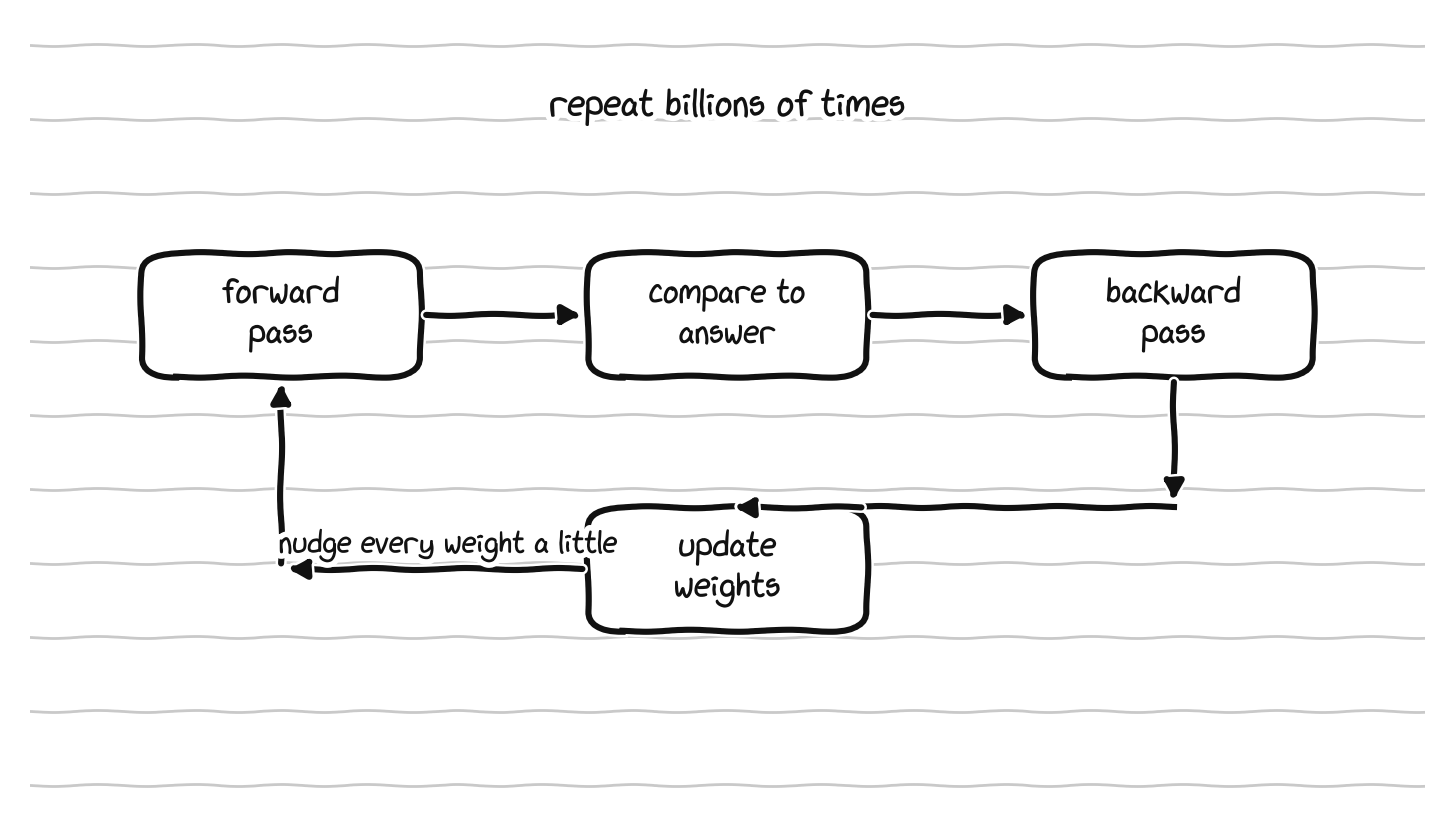
Training repeats one loop: forward pass, compare to the answer, backward pass, update the weights.
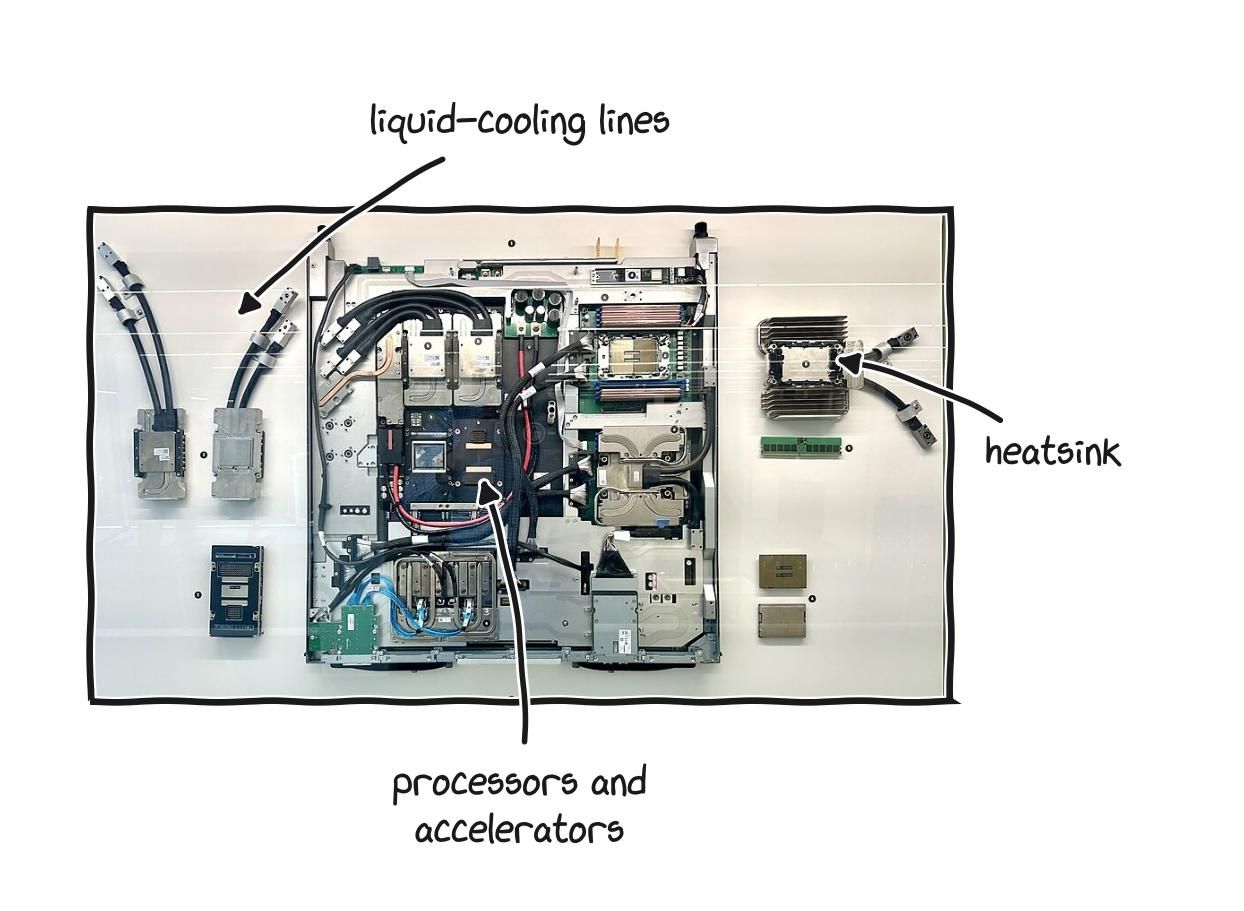
A liquid-cooled server node, the kind a large training run fills entire rooms with.
The training loop explains the hardware obsessions of the field. Why parallel processors: because the math is millions of independent multiplications that can all happen at once. Why low precision: because doing the multiplications in 8 or 4 bit roughly doubles throughput at each step, and training tolerates it. Why bandwidth dominates: because both training and, even more so, generating text require streaming the weights and intermediate values in and out of memory constantly, which puts the work on the memory bound side of the roofline. And why a single chip is never enough for a frontier model: because the model does not fit. A model with hundreds of billions or trillions of weights is far larger than the memory of any one accelerator, so it has to be split across many of them, which introduces the last great bottleneck, the network between the chips.
When a model is split across many accelerators, those chips have to constantly exchange data to stay in sync, and the time spent moving data between machines can come to dominate the time spent doing useful computation. This is why the interconnect, the high speed network linking the accelerators, is treated as a first class part of an AI system rather than an afterthought, and why the operating system and networking layers are being rebuilt specifically for this kind of traffic, a point that returns later. There are several ways to split the work, by handing different chips different slices of the data, or different layers of the model, or different pieces of each individual layer, and choosing the right combination for a given model and a given cluster is one of the central crafts of large scale training. The recurring lesson is the same one from the memory section: at scale, moving data is the expensive part, and the systems that win are the ones that move the least.
A counterintuitive result sits at the center of all this and is worth knowing by name, because it changed how the entire industry allocates its resources. For years the assumption was that the way to a better model was simply a bigger model. Then a line of work on scaling laws, most influentially the Chinchilla result from 2022, showed that for a fixed amount of compute, the best models are not the biggest ones but the ones that balance model size against the amount of training data, in a roughly fixed ratio. Train a given size of model on the compute optimal amount of data, rather than just making the model larger, and you get a better result for the same cost. A smaller model trained on more data beat a much larger model trained on less. This kind of insight comes from treating the system as a whole, the interaction between compute, memory, data, and model size, rather than from optimizing any single component, and it is a good example of why the depth this guide is arguing for actually pays.


Chinchilla, roughly: total compute is about six times parameters times tokens, and the compute-optimal split puts about twenty tokens behind every parameter.
One practical consequence of all of this deserves stating plainly, because it saves people money and confusion. If you are learning machine learning, you very probably do not need a powerful GPU inside your own laptop. The heavy work, training and large scale experimentation, runs best on the kind of accelerators described above, with their exotic memory and interconnects, and you can rent those by the hour from cloud providers, including free tiers for learning, while your own laptop simply controls the distant machine over the network. A laptop with no discrete GPU but generous memory and a good CPU is often the smarter choice for someone learning this field, as long as they have reliable internet, because the bottleneck is rarely the local hardware. The exception is someone who must do GPU work where there is no connection. Match the decision to your real situation rather than to a fear of missing out, and put the money you would have spent on a laptop GPU toward cloud compute or more system memory instead.
part 7: open source, explained from scratch
Open source is one of those phrases that gets used constantly and explained rarely, and it sits underneath almost everything else in this guide. It is worth doing properly.
Imagine two restaurants that both sell an excellent chocolate cake. The first sells you the cake and nothing else. It is delicious, but the recipe is a secret, so if you want that cake again you must come back and pay again, and if the restaurant closes, that cake is gone from your life forever. You can eat the cake, but you cannot understand it, recreate it, improve it, or share it. The second restaurant sells you the cake and prints the full recipe on the box. Now you can bake it yourself, adjust it to your taste, teach a friend, and if the restaurant closes, the recipe survives. The cake is the product. The recipe is the source. Open source simply means the recipe is published.
For software, the recipe is called source code, the human readable instructions programmers write, which then get translated into the program you actually run. Closed source software, also called proprietary software, ships you only the finished program and keeps the source code a trade secret, which is how Windows and macOS work: you can run them, but you cannot read how they work, change them, or legally share modified copies. Open source software publishes its source code so anyone can read it, study it, change it, and share it, which is a deliberate choice by the people who write it, not piracy and not a loophole. The movement around this has a clear definition of what software freedom means, often summarized as four freedoms: the freedom to run the program for any purpose, to study how it works, to share copies, and to share improved versions. When all four are present, the software is free in the sense of liberty, which is separate from price. Free software in this sense means freedom, not zero cost, and the two ideas get mixed up constantly. Open source is not a fringe experiment. It runs most of the internet, most of the world’s servers, the core of every Android phone, and, as we will see, the operating systems that most machine learning is actually done on.
The harder and rarer cousin is open source hardware. Software is just information, so publishing its recipe is straightforward, but a physical object’s recipe is a collection of design documents: the computer models of the physical parts, the schematics that show how the components connect electrically, the layout of the circuit board, the description of what each contact on every connector does, the exact list of parts used, and the firmware that runs on it. Open source hardware means a company publishes these documents so other people can understand, repair, modify, reproduce, and build on the design. This is much rarer than open source software for a plain reason: publishing software costs almost nothing once it is written, while designing hardware is expensive, the designs are commercially sensitive, and a company that opens its hardware is handing real information to its rivals. So when a hardware company opens its designs anyway, that choice is a real signal about its priorities.
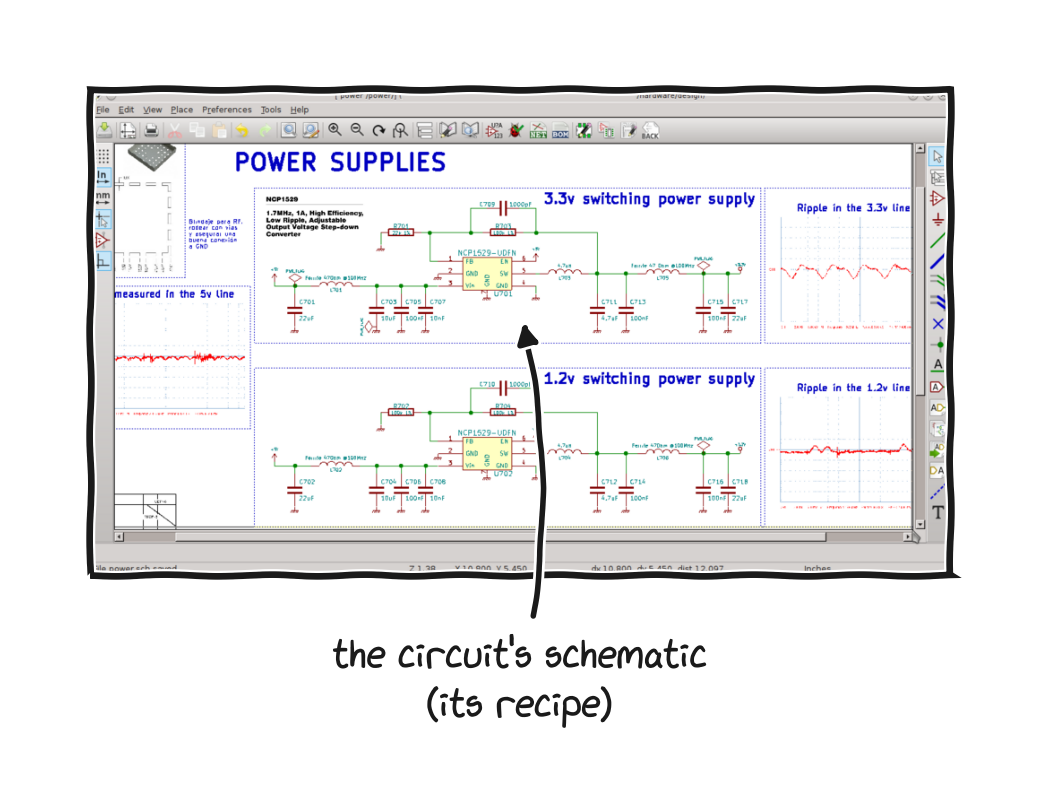
Open hardware ships its design files, like this circuit schematic drawn in KiCad, a free design tool.
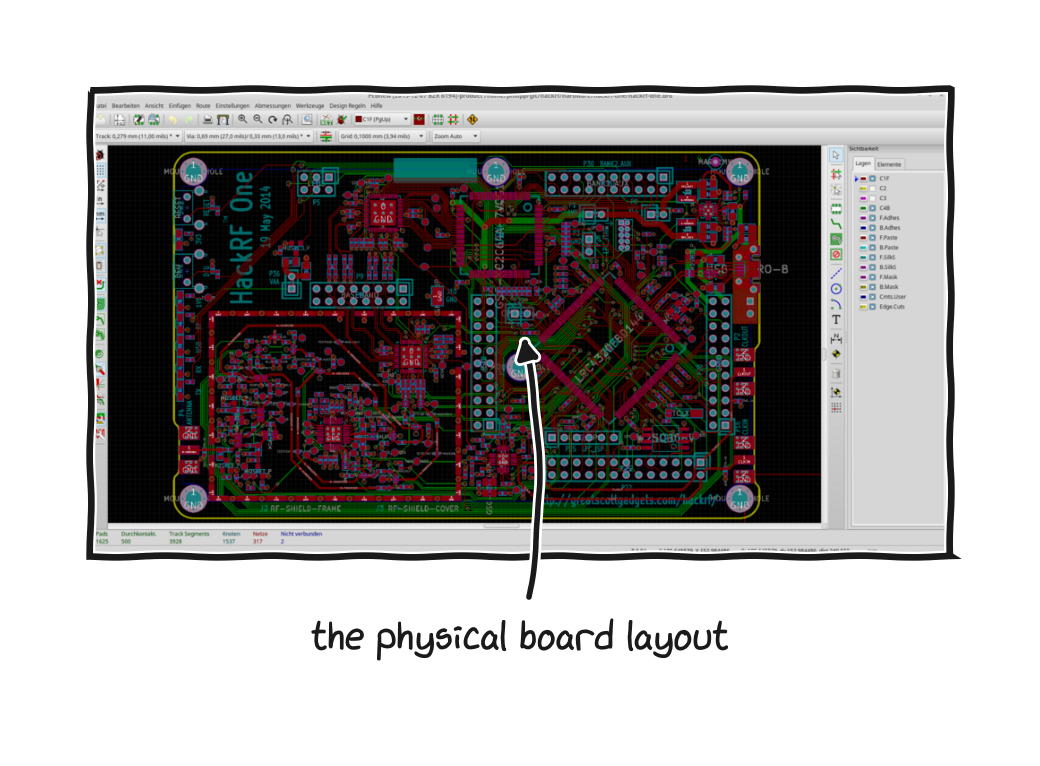
The same tool laying out a physical board, here for HackRF One, an open-source radio.
The clearest example you can hold is Framework, a company that builds repairable laptops and publishes the full design documentation for its machines in the open, including the computer models, the mainboard drawings, the connector pinouts and part numbers, and the electrical schematics, all under a Creative Commons license, the same family of open licenses used for freely shared books and music. Their stated goal is to let other people design parts that fit the laptop, including replacement mainboards made by someone other than Framework, and every major part is sold individually and designed to be swapped by the owner, down to the ports, which are modules that slide in and out. A normal laptop is a sealed box whose insides are a trade secret. This is the opposite. If the company disappeared tomorrow, the knowledge needed to keep its laptops working would still exist in public.
A second choice worth naming is much older. The Lenovo ThinkPad T14 Gen 7, released in 2026, reaches the same goal from a different direction. Lenovo does not publish its design files the way Framework does, so the designs are not open in that sense, but the machine is built to be opened and serviced, and the company documents how, down to QR codes inside the case that link to the official service steps. The bottom cover comes off easily, the battery releases with two buttons and no screwdriver, the USB-C ports sit on small replaceable boards instead of being soldered to the mainboard, and the keyboard and fan are made to be swapped or cleaned without taking the whole machine apart. The memory is not soldered either, but uses a newer removable module called LPCAMM2, which keeps the low power draw of soldered laptop memory while still letting you change how much you have, which is rare in a thin laptop. The repair site iFixit, whose scores have become a rough industry scoreboard, gave it a perfect ten out of ten, the first T series ThinkPad to reach that mark. Framework opens the designs so anyone can build for the machine, while ThinkPad keeps the designs closed but engineers the hardware so the parts that wear out can be replaced by the owner, and both are real answers to the sealed box from Part 1.
The idea reaches across the whole range of technology. Arduino is a family of simple, inexpensive circuit boards used to build electronic projects, with openly published board designs, and that openness is a large part of why it spread from a tool for students into a worldwide standard. The Raspberry Pi, a small and cheap computer used in education and in countless projects, is built around an ecosystem that leans heavily on open documentation and open software. The tools used to design open hardware can themselves be open, like KiCad, a free program for designing professional circuit boards, which means you no longer need an expensive license just to begin designing electronics seriously. And open hardware works at industrial scale: the Open Compute Project, started by the company now called Meta, publishes open designs for the servers, storage, and networking gear that fill large data centers, and the specifications have been adopted by companies including Microsoft, Intel, and Google, which shows that opening hardware designs is not only something small idealistic companies do but can be a serious strategy at the largest scale, where sharing a design lets many companies split the cost of improving it and avoids each one being locked to a single supplier.
That connects back to ownership. Open source supports the five freedoms directly: it enables repair, because you cannot properly fix what you are not allowed to understand; longevity, because open designs outlive the company that created them; independence from a single point of failure, since you do not depend on one business staying alive and staying friendly; a community of independent people creating parts, fixes, and improvements; and transparency, because open systems can be inspected, which builds a more honest kind of trust than “just believe us.” You will not always be able to buy a fully open machine, and that is fine. Openness is a real value worth weighing alongside price and performance.
part 8: embedded systems, the invisible majority
When people picture a computer they picture a laptop or a phone, but those are a tiny fraction of the computers in the world. The overwhelming majority are embedded systems, the small, special purpose computers built into other things: the controller in a microwave, the chip in a car’s engine management, the brain of a router, a thermostat, a pacemaker, an industrial sensor, a smart light bulb. There are tens of billions of these, far more than there are general purpose computers, and understanding them fills in a large part of the picture of how computing actually works and why open source matters where the stakes are quietly highest.
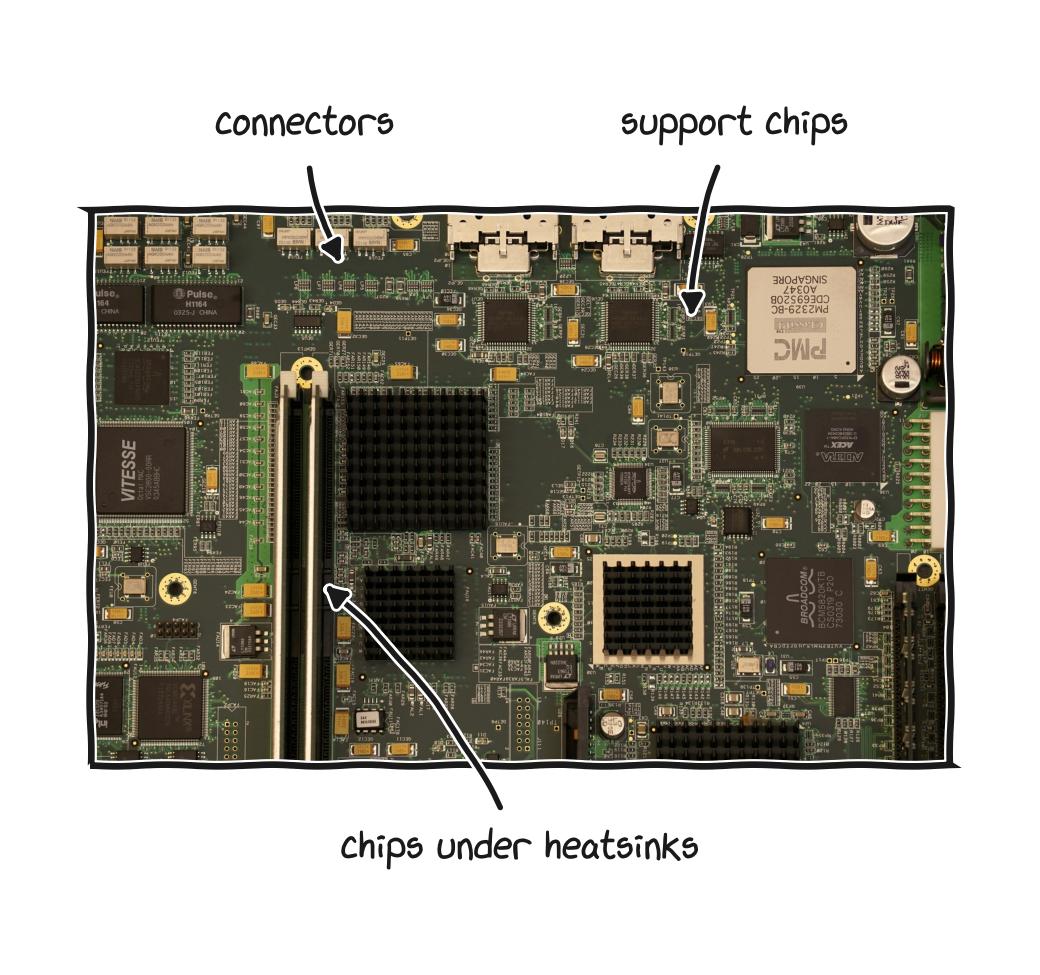
Boards like this run quietly inside appliances, cars, routers, and machines most people never open.
An embedded system is usually built around a microcontroller, which is a single chip that combines a modest processor, a small amount of memory, and the connections to the outside world all in one package, designed to do one job reliably for years on very little power. Where a laptop runs a large general purpose operating system juggling hundreds of programs, many embedded systems run either no operating system at all, just a single program in a loop, or a real time operating system, an RTOS, which is a small, stripped down operating system whose defining feature is that it can guarantee a response within a fixed, tiny amount of time. That guarantee matters enormously in the physical world. An anti lock braking system that usually responds quickly but occasionally takes an extra few hundred milliseconds is not acceptable, because the few hundred milliseconds is a crash. A general purpose operating system optimizes for average performance and is willing to let any single task wait when something more important comes along, while a real time system optimizes for the worst case, which is a genuinely different design goal and a window into why “fast” is not one thing.
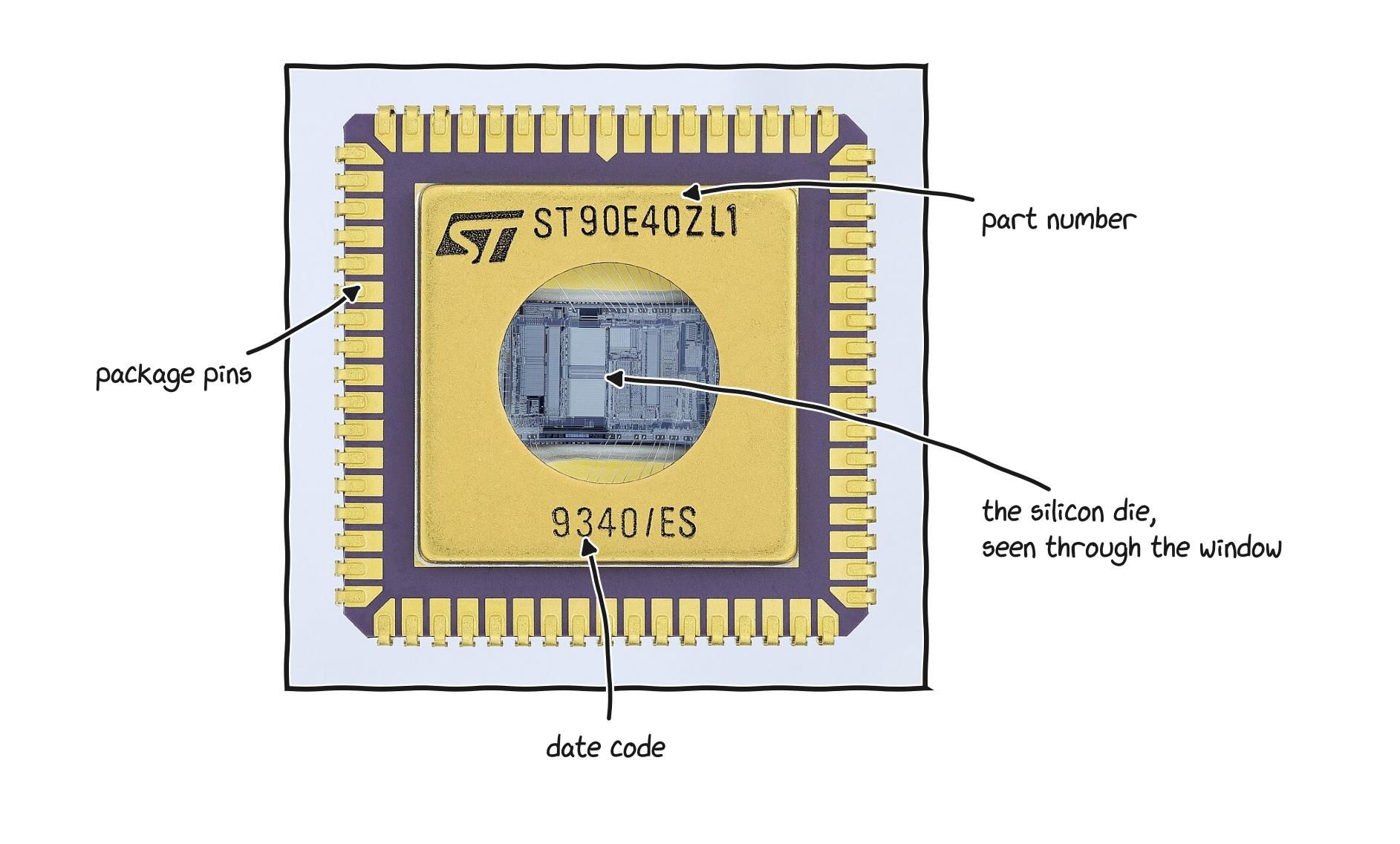
A microcontroller with its lid removed: a whole small computer, processor and memory together on one chip.
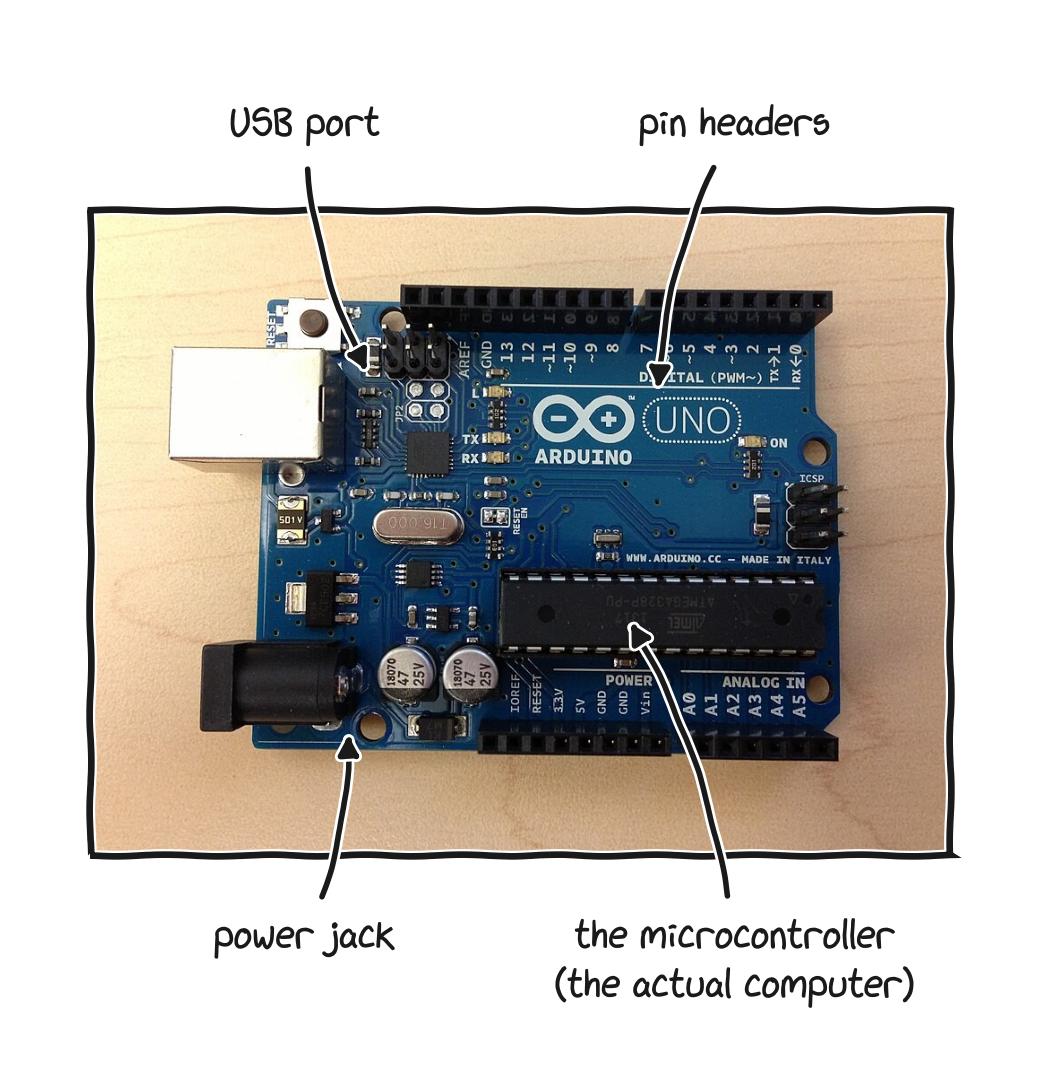
An Arduino board: cheap, open, and the usual first way people learn to program real hardware.
Open source matters more in embedded systems than almost anywhere else, for three reasons that all come back to the five freedoms. The first is longevity. Embedded devices live for a very long time, often decades in industrial and medical settings, far longer than any company’s support window, and when the firmware is locked and proprietary, the device dies when the company stops caring, while open firmware can be maintained by whoever depends on it. The second is security. These devices increasingly sit on networks, and a closed device whose code nobody outside the manufacturer can inspect is a device whose security flaws nobody outside the manufacturer can find or fix, which is a serious problem when the device is in a hospital or a power grid. The third is control, which is the firmware point from Part 1 in its sharpest form: in an embedded system the firmware is not a layer beneath the operating system, it often is the entire system, so whoever controls the firmware controls the device completely. This is the layer where parts pairing and remote disabling live, and it is the layer that the open instruction set movement, discussed next, is ultimately trying to pry open.
This is also where the open hardware story has gotten furthest in practice. The open instruction set architecture RISC-V, which the next part covers, already has its strongest foothold in embedded systems and microcontrollers, precisely because the embedded world is cost sensitive, values the ability to customize a chip for one job, and does not carry the heavy weight of decades of legacy software that holds back change in laptops and servers. If you want to see where open hardware is actually being built today, it is not in laptops. It is in the billions of small chips that nobody thinks of as computers.
part 9: operating systems and the world of linux
The operating system, often shortened to OS, is the core software that makes the hardware usable. It manages the components, runs your programs, schedules which task gets the processor next, decides what stays in memory, talks to storage and the network, enforces security, and gives you something to interact with. Think of it as the layer that turns a box of components into something you can actually work with. It has an outsized effect on everything else, because every other program depends on it, and poor scheduling or memory decisions by the operating system slow down every application running on top of them.
There are three you have probably heard of. Windows, made by Microsoft, is the most widely used desktop system and comes preinstalled on most laptops, runs the widest range of software and games, and is closed source, with Microsoft controlling its direction, including when older versions stop receiving support. macOS, made by Apple, runs only on Apple’s own machines, is polished and well integrated with other Apple devices, and is also closed source and tied permanently to Apple hardware. ChromeOS, made by Google, is a lightweight system built around the web browser, common on inexpensive Chromebooks, and best suited to people who live mostly in a browser. Each can be the right choice, and each also keeps you, to different degrees, inside one company’s world, which is the natural place to introduce the alternative.
Linux is a family of operating systems built on open source software. Remember the recipe analogy: Linux is the operating system whose recipe is public, so anyone can read it, study it, improve it, and share it, and no single company owns it or controls your access to it. For the theme of this guide that matters enormously, because Linux is the operating system equivalent of owning rather than renting. The practical benefits are real: it is free of charge, every version, forever; it runs well on older hardware, which extends the life of machines that Windows would treat as obsolete; it respects your control, since it does not force updates at bad moments, does not push advertising into your desktop, and collects far less data about you; it gets far fewer viruses; and it is endlessly customizable. Linux is not perfect for everyone, since a small amount of Windows only software, certain games, and some specialized professional applications do not run on it without workarounds, but for browsing, writing, office work, programming, and data work it is fully capable, and for programming and data work in particular it works well.
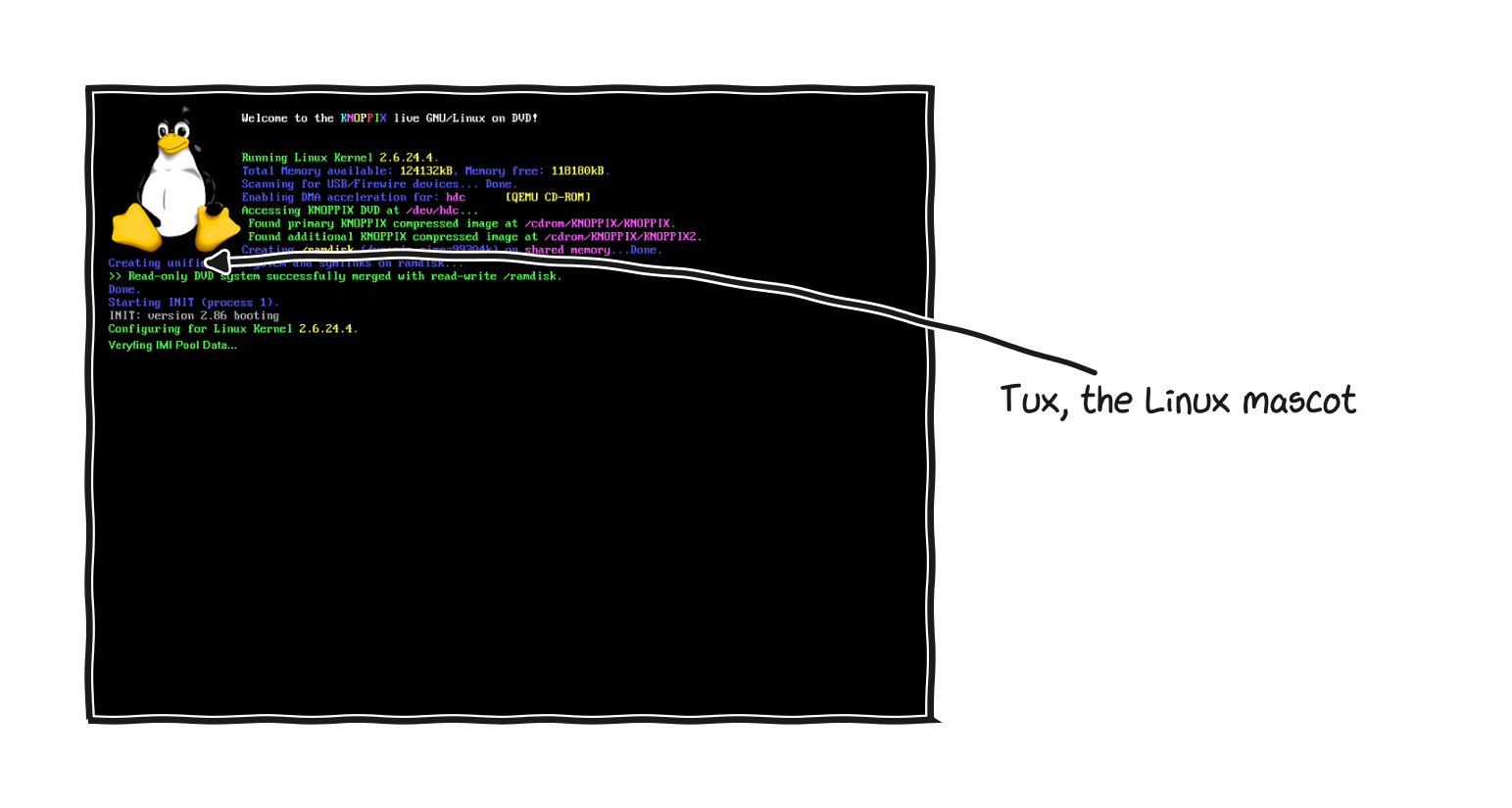
Linux starting up, with the penguin named Tux as its mascot.
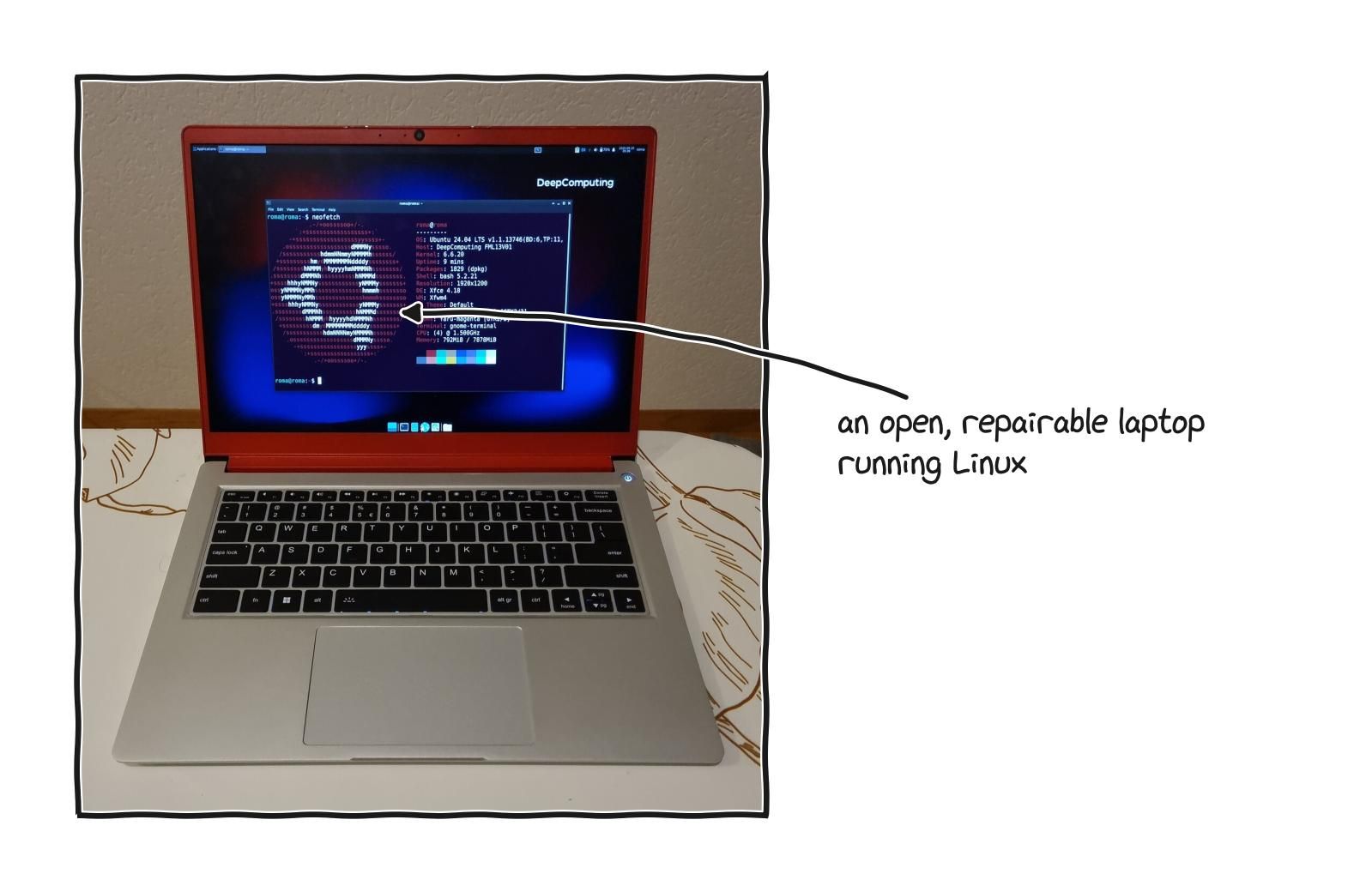
A Linux desktop on a laptop, where the look and feel is a choice among many distributions, not one fixed system.
Programming and data work means Linux, even if you never install it yourself. Nearly the entire world of machine learning and server computing runs on Linux. The training clusters, the cloud servers, the containers that package and ship modern software, the tools that the field is built on, all assume Linux underneath. If you are serious about computer science or about working in AI, you are going to be working on Linux whether you install it on your own laptop or not, because that is what the real systems run. Learning it on your own machine is free and worth doing.
People do not really install “Linux,” they install a distribution, usually shortened to distro, because Linux at its core is just the engine, and a complete usable system also needs a desktop, default programs, a way to install software, and a particular philosophy about updates and stability. A distribution is the whole car built around that engine, assembled and polished by a team. There are hundreds, but a handful cover almost everyone. Linux Mint is calm, familiar, and forgiving, the gentlest start for someone coming from Windows. Ubuntu is the popular all rounder, whose huge community means almost any question has already been answered somewhere and almost any Linux software supports it first. Fedora delivers newer technology sooner, a strong choice for developers and recent hardware. Pop!_OS is built on Ubuntu with extra attention to people doing demanding work and to laptops with discrete graphics. Debian prizes rock solid stability and is a favorite for servers. Arch, and its friendlier relative Manjaro, give you control and a deep understanding by having you build the system up yourself. And lightweight members of the Ubuntu family like Xubuntu and Lubuntu can rescue an old, slow laptop. Do not agonize over the choice, because it is far less permanent than it feels, and most distributions can be run in “live” mode straight from a USB stick without touching what is already installed, which lets you try several and keep the one that feels right.
part 10: ai and the operating system
The operating system is being reshaped by AI from both directions at once. This is one of the more active research frontiers in systems right now, and it is worth understanding the structure rather than just the headlines.
For most of computing history, operating systems made their decisions using hand written rules and heuristics. A scheduler used a fixed formula to decide which task gets the processor next, a memory manager used a fixed algorithm to decide which page of memory to evict when space ran out, a storage system used a fixed policy to organize files. These rules were the product of careful study and worked well enough for the workloads of their era, but the workloads changed faster than the rules. Hardware stopped being uniform, with a single machine now combining processors from different vendors, GPUs, specialized accelerators, and several tiers of storage, and a rule tuned for one configuration performs poorly on another. Workloads became unpredictable, with hundreds of services scaling up and down and interacting in ways that are hard to anticipate. And the number of competing goals multiplied, since an operating system is now expected to optimize for latency, throughput, energy, fairness, isolation, and security at the same time, and these goals conflict. Hand tuned heuristics cannot balance that many objectives across the full range of situations a system encounters, and the gap between what the hardware could deliver and what the operating system actually achieves keeps widening. That gap is the problem this research is trying to close.
The work divides into two complementary directions. AI for OS means using AI techniques to make the operating system itself smarter, replacing static heuristics with models that learn from the actual workload and adapt as conditions change: a scheduler that learns the patterns of a system and allocates processor time better than a fixed algorithm, a memory manager that predicts which pages will be needed and fetches them early, an I/O layer that predicts which storage requests will be slow and routes them differently, a network stack that learns a specific network and adapts its transmission strategy. Some of these are already real, with small neural networks embedded directly in the Linux kernel imitating scheduling decisions at very low overhead, and predictive models in the storage path cutting worst case latency substantially. OS for AI means the reverse, redesigning the operating system to better support AI workloads, which put unusual demands on a system: high throughput between memory and accelerators, low latency for inference, efficient coordination across many GPUs, and special handling of the very large model files that have to be loaded and managed. The two directions reinforce each other, because as the operating system gets better at supporting AI, more sophisticated AI becomes feasible inside the system itself.
The choice of which kind of AI to use for a given systems problem matters, because not all AI is the same, and a recent survey of the field organizes the options into three categories with different trade offs. Traditional machine learning, things like decision trees and small neural networks, works with structured data and produces outputs that are fast, predictable, and cheap enough to run inside the kernel in microseconds, but the models are narrow and fail when the workload drifts from what they were trained on. Large language models bring the ability to reason about code, understand natural language descriptions of problems, and adapt to new situations through prompting rather than retraining, but they are far too slow and expensive to run in a path that has to complete in microseconds, so they live at higher levels of abstraction, writing configuration files, explaining diagnostics, assisting administration. Agents, the newest category, combine a language model with the ability to perceive an environment, plan a sequence of actions, invoke tools, and adapt based on results, and they are used for long running tasks like end to end debugging and coordinated management of large systems, at the cost of being slower and more resource hungry still. The progression from traditional machine learning to language models to agents is a set of trade offs, not a ranking: fast and narrow versus flexible and slow versus autonomous and expensive. Real systems will use all three, with traditional models in the performance critical kernel paths, language models in the higher level decision making, and agents for long running orchestration. Four dimensions decide the choice in any given case: how tight the time budget is, how varied the task is, how much you need to understand the decision afterward, and how much precise numerical accuracy the decision requires, where traditional models still tend to win because language models can produce confident answers that are quantitatively wrong.
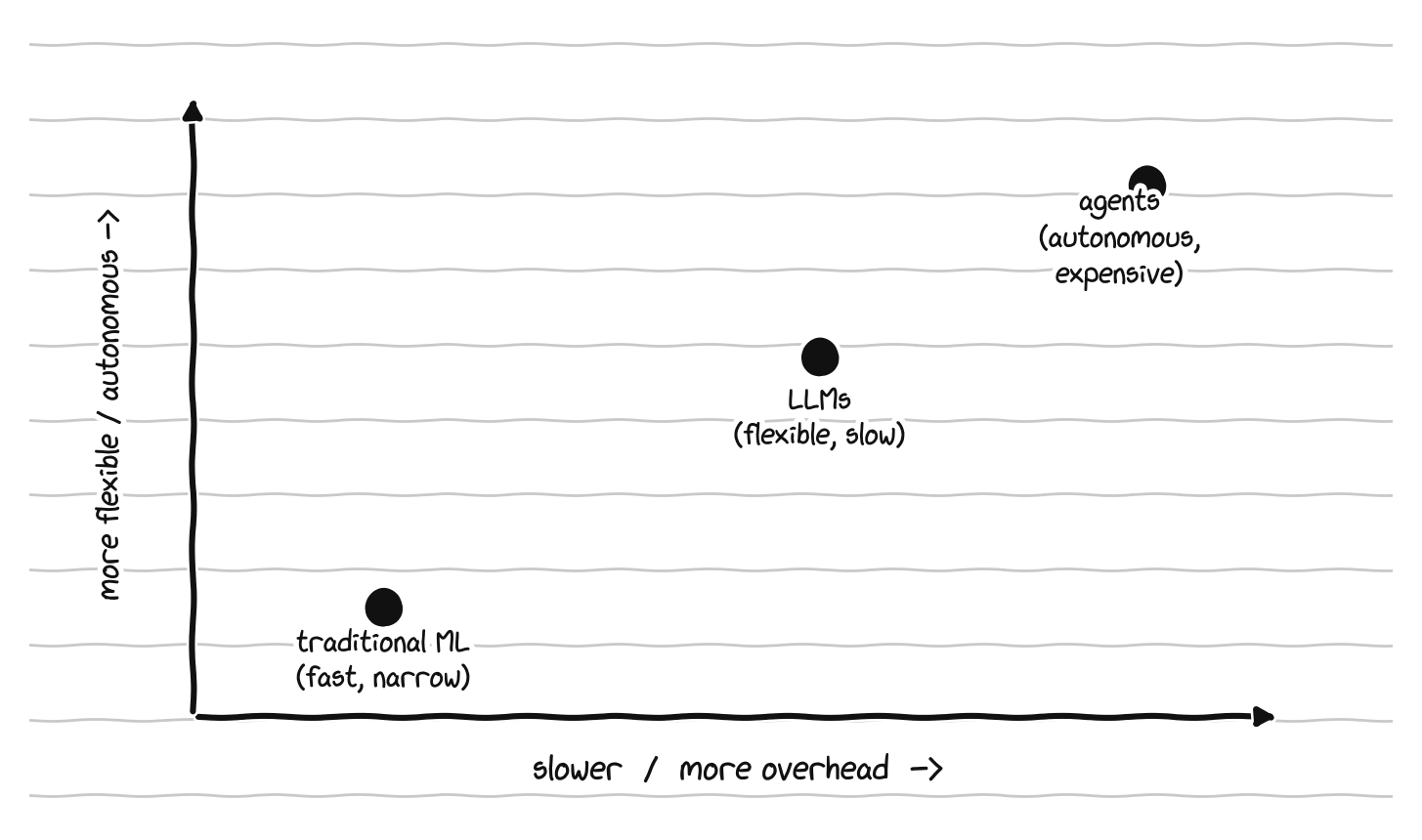
Three kinds of AI for systems, and the trade-off between them: fast and narrow, flexible and slow, autonomous and expensive.
On the OS for AI side, specific subsystems are being rebuilt. Schedulers are being made aware of the structure of AI workloads, where short inference requests need tiny dispatch latency while distributed training jobs need coordination across many nodes, and these conflicting demands have to coexist. Memory managers are being adapted for models that are hundreds of gigabytes and need to move efficiently between system memory, accelerator memory, and storage. Networking is being rebuilt around distributed training, including kernel bypass techniques that let applications send and receive data without going through the operating system at all, eliminating the overhead of system calls. Storage is being redesigned for streaming huge datasets and saving and loading checkpoints quickly. And at the architecture level, designs like library operating systems and unikernels, which strip an operating system down to just what one application needs and compile it together with that application, trade generality for performance in a way that makes sense when a single well defined AI workload runs on dedicated hardware.
The research community has sketched a three stage roadmap for how far this goes. The first stage is the AI powered operating system, essentially what we have now, where AI is added to an otherwise traditional system as a set of intelligent modules that enhance specific functions without changing the underlying architecture, easy to reach because nothing has to be rebuilt, but limited because the system it enhances was not designed for intelligent decision making. The second is the AI refactored operating system, a deeper transformation where intelligent mechanisms are built into the structure of the system itself, with kernel interfaces designed to be AI friendly from the ground up and subsystems built around the assumption that models, not static rules, will control them. This is the stage most ambitious current research is aiming at, and it requires significant investment because much of the existing infrastructure has to be rebuilt. The third is the AI driven operating system, the full transformation, where the system is driven by AI at every level, with embedded models making most decisions and hand written rules playing a secondary role as guardrails, closer to a learned system than a programmed one. That stage is mostly speculative, with a few experimental systems pointing in its direction, and the reason it matters is that it clarifies what would have to be solved between now and then.
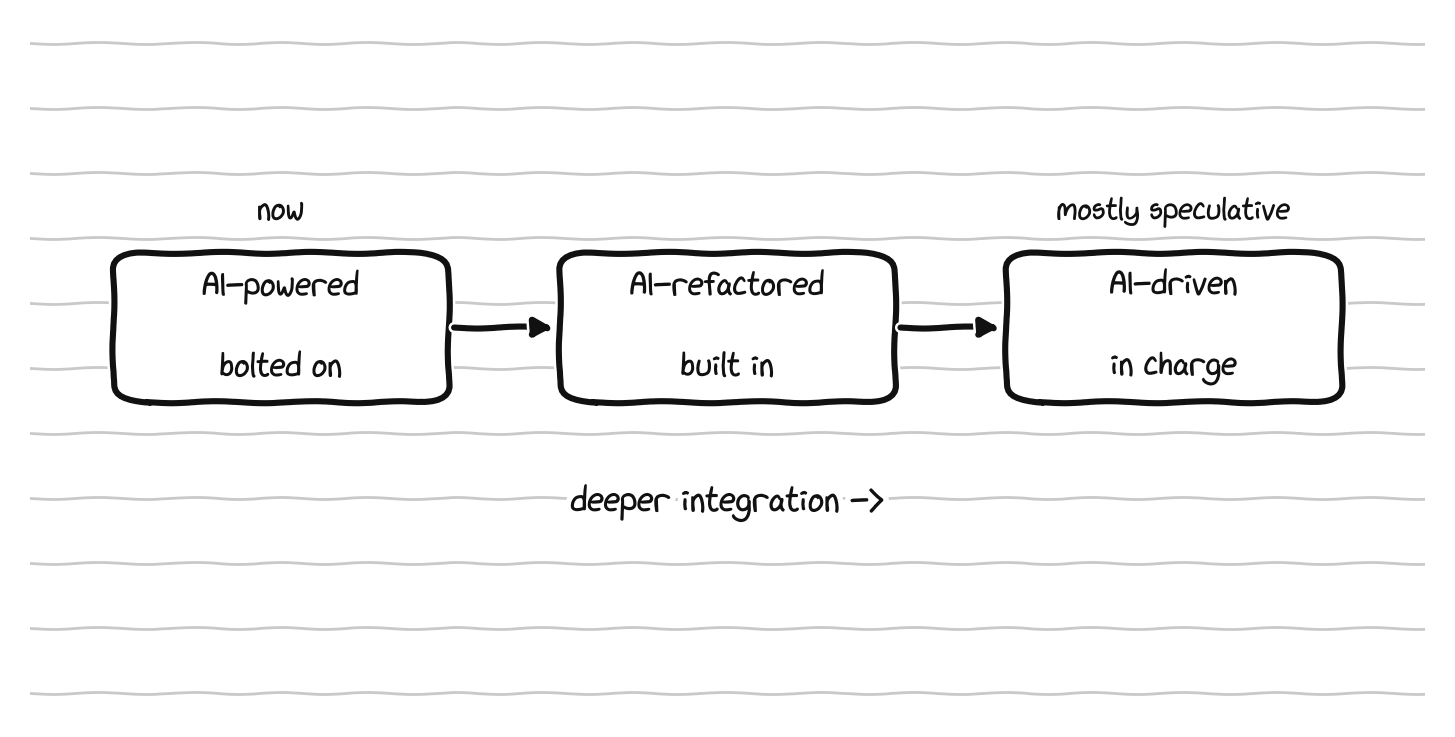
The roadmap: AI bolted on, then built into the structure, then in charge.
The research also has honest limits. The integration faces several serious problems. Complexity, because a system combining static rules, machine learning, language models, and agents is far harder to debug, understand, and maintain, and the interactions between intelligent components can produce behaviors none of them would produce alone. Performance overhead, because every AI decision costs computation, and a model that adds even a couple of microseconds to a scheduling decision matters when the system makes a million of those decisions a second. Model drift, because a model trained on one period’s workload performs worse as the workload evolves, and operating systems run for years. Interpretability, because when a static rule makes a bad decision an engineer can read the rule and fix it, while a learned model can be a black box whose decisions are hard to explain, which makes debugging and trust harder. And privacy and safety, which tend to be underestimated, because an operating system has access to enormous amounts of sensitive data, models trained on that data raise privacy concerns traditional systems did not have, and a model can be attacked by an adversary who crafts inputs to fool it in ways that rule based code cannot be. None of these is fatal, but progress will be paced by progress on these problems as much as by progress on the AI techniques themselves, and the current excitement sometimes obscures that the field is still early.
part 11: the chip ecosystem and who controls it
Who actually makes the most important components in the world is the deepest layer of the ownership question, and the one least often explained to ordinary buyers.
Recall that every processor speaks a particular instruction set, and that two of them dominate laptops and desktops, x86 and ARM. Look at who controls each and a striking picture appears. x86 has powered personal computers for more than four decades and is controlled in practice by exactly two companies, Intel and AMD, which hold the patents and cross licenses between them, an arrangement that means no third company can simply decide to start making x86 processors. That is a duopoly, and it has been one for decades. ARM works completely differently. The company behind ARM does not manufacture any chips. It designs the instruction set and the core blueprints and licenses them to other companies, which design and build their own chips around that base, which is why ARM processors come from many companies at once, including Apple, which designs its own, and Qualcomm, which makes them for a wide range of devices. ARM began in small battery powered devices where efficiency mattered most, and when Apple moved its laptops to its own ARM chips it proved something the industry had doubted, that an ARM processor could be not only efficient but genuinely fast, fast enough to compete with x86 directly. x86 dominance is, for the first time in decades, in real question.
Underneath the instruction set sits a fact that is rarely mentioned and is among the most important in all of technology: designing a chip and manufacturing a chip are two completely separate activities done by different companies. Apple, AMD, NVIDIA, and Qualcomm design chips. Very few companies on Earth can actually manufacture the most advanced ones. The factories that do this are called foundries, and the most advanced chips, regardless of whose brand name is printed on them, are overwhelmingly manufactured by a single company, TSMC, based in Taiwan. A very large share of the most important physical products of the modern economy depends, at the deepest level, on one company in one place. That concentration is extremely efficient, and it is also fragile, exposed to natural disaster, supply disruption, and geopolitics in a way that has no easy fix. The same concentration appears in the high bandwidth memory that AI accelerators depend on, where a single supplier holds the majority of production and the entire next year’s supply has been sold out in advance, and in advanced packaging, the increasingly difficult step of bonding memory and processors together, which is again dominated by a handful of providers. The pattern repeats at every layer: a small number of companies hold the foundations everyone else builds on.
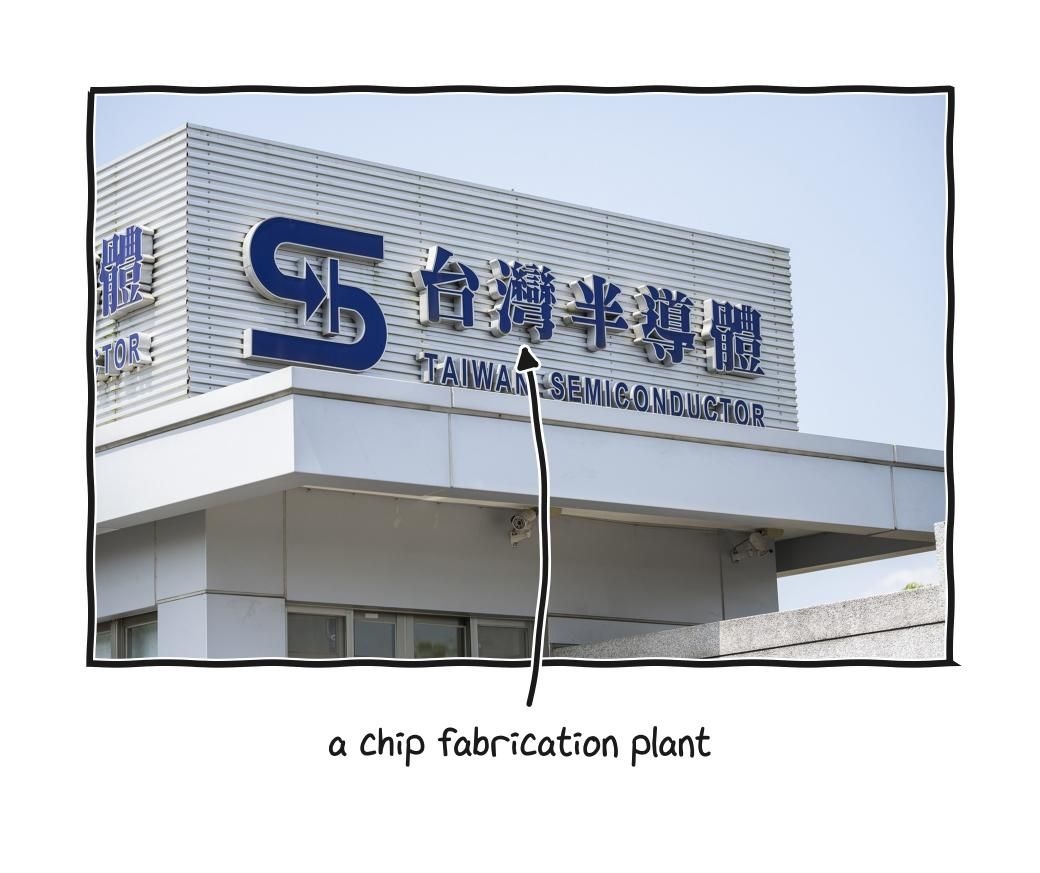
The advanced chips behind everything come from a few fabrication plants, each costing tens of billions to build.
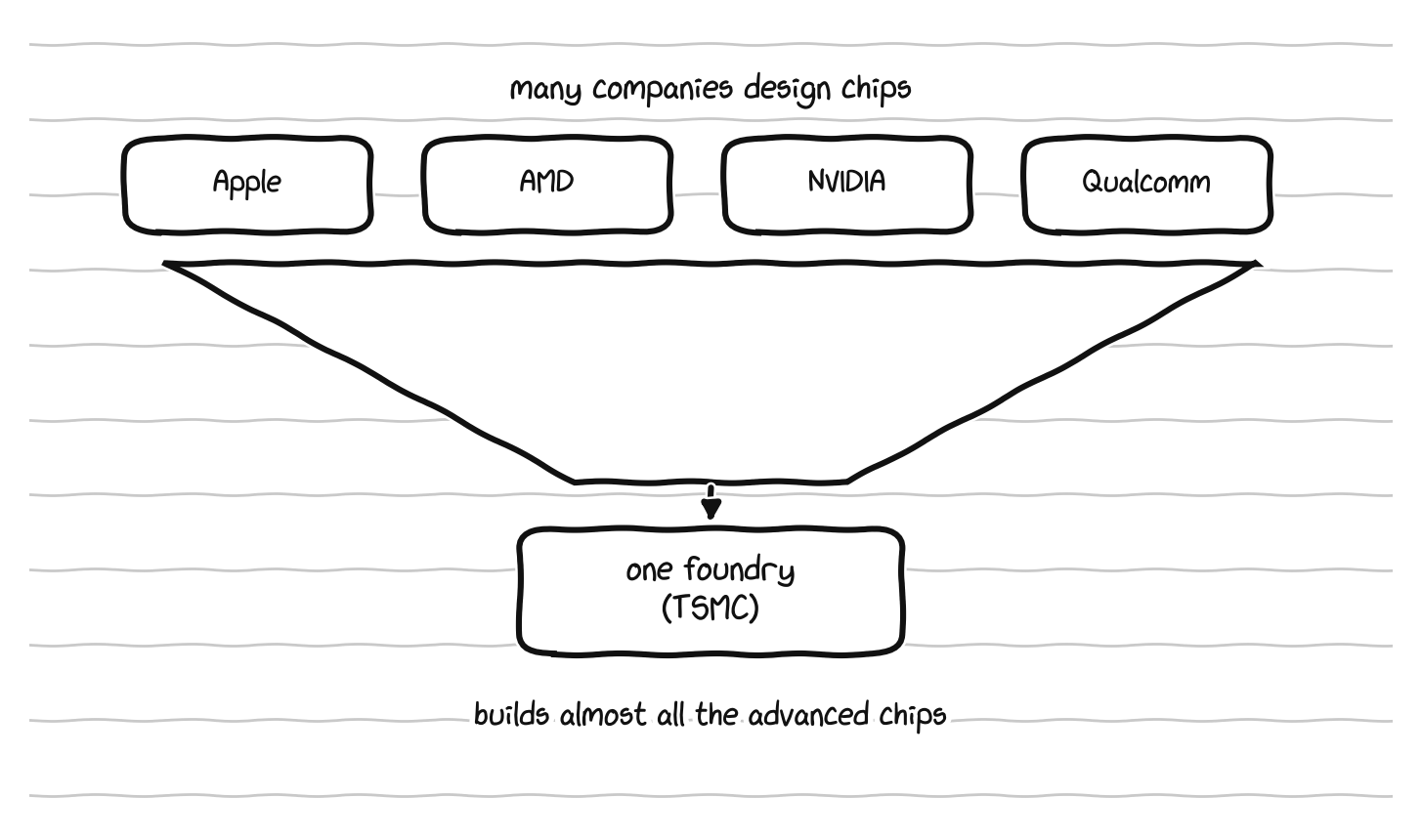
Many companies design chips, but almost all the advanced ones are built by a single foundry.
The graphics and AI accelerator market shows the same shape, reinforced by software. Three names matter, NVIDIA, AMD, and Intel, but they are not three equal competitors. NVIDIA dominates, especially for AI, and the reason is not only its hardware but CUDA, the software layer from Part 5 that lets programmers use a graphics chip for general computation, which arrived early, was invested in relentlessly for years, and became the thing the entire field built itself on. Competitors exist, with AMD offering a more open alternative and various cross platform efforts trying to break the dependence, but a tool that everyone already knows, that all the tutorials are written for, and that all the existing code expects, has a gravity that is genuinely hard to escape. The CUDA moat, the x86 duopoly, and a single dominant foundry are the same pattern playing out at three different layers.
It would be easy to treat all of this as simply sinister, and it is more honest to weigh it properly, because there is a real case on each side. Designing a leading edge chip is staggeringly expensive, costing billions and demanding rare expertise, and that level of investment may genuinely require large, well funded companies and the economies of scale that concentration brings. The x86 duopoly, for all its limits, has not been gentle competition: Intel and AMD have fought fiercely for decades, and buyers have gained enormously from that fight, in steadily better chips at steadily better prices. Standards are easier to maintain with a few players than with a chaotic crowd. And whatever its flaws, this structure has delivered decades of almost unbelievable progress. But the costs are just as real. A market with few players has real pricing power and a free hand to shape the market in ways that quietly extract more money, including design choices like soldered memory that push you to buy more than you need or replace sooner than you should. Lock in traps users and slows down even excellent competitors, which makes the market less free than it appears. Dependence on a single dominant manufacturer makes the whole system fragile to events in one region. And closed instruction sets, closed firmware, and closed drivers mean that no matter how much you care, you can never fully see into or control the foundations of your own computer. Both are true at once. The same structure produced genuine wonders and genuine traps, and an honest view holds both.
There is one development worth knowing about, because it is the same idea as open source software applied to the most fundamental layer of all. It is called RISC-V, an instruction set architecture like x86 or ARM, with one defining difference: it is open and free, so anyone can design a chip that uses it without paying a license fee or asking permission. If x86 and ARM are private languages owned by companies, RISC-V is a public language that belongs to everyone, loosely the Linux of processor architectures. It came out of UC Berkeley and is now governed by a member organization with thousands of participants, and the numbers are real, with more than ten billion chips containing RISC-V cores already shipped and forecasts running to many tens of billions by the end of the decade. It is already widely used in the small, simple chips embedded inside other products, where its lack of royalties and its customizability are decisive, and it is being pushed hard in higher performance directions, with early laptop mainboards, ambitious data center cores from new entrants, and strong national interest, particularly from countries that want to design and build chips without depending on architectures controlled elsewhere, a motivation usually called semiconductor sovereignty. It is fair to be realistic about where it stands: for laptops and high performance computing it is not yet competitive with x86 or ARM, and the gap is mostly software ecosystem maturity rather than raw capability, with the same translation problem ARM faced when running old x86 software. A RISC-V laptop today is an experiment for enthusiasts, not a practical daily machine. Right now its importance is not as a product but as a direction, and as working proof that even the deepest layer of computing does not have to be privately owned. The same spirit shows up in efforts toward open standards for GPU computation that could one day soften the CUDA moat, and in open firmware and open drivers.
The measured conclusion is not that the companies that exist today should be destroyed, since they fund real research, employ rare expertise, and have delivered real progress. The healthier direction is simply more: more architectures genuinely competing, with ARM challenging x86 and RISC-V maturing behind them; more open standards for computation, so one company’s software is not the only gateway to a field; and more diversity in who manufactures the most advanced chips, so the world does not balance on a single point. Concentration is not evil, but it is fragile and it is comfortable, and comfortable industries tend to build for their own convenience unless something keeps pushing them.
part 12: the economics of control
The design choices from Part 1 are not random or merely technical. They are economically rational for the companies that make them, and seeing the economics makes the whole pattern legible.
The combined effect of soldered parts, sealed batteries, hard to open cases, locked firmware, and parts pairing shows up most plainly when something breaks. A consumer group in the United States recently examined fifty eight common household machines, blenders, coffee makers, and vacuums, and found that nearly two thirds earned a failing grade for repair support. Only three of the fifty eight came with a repair manual. When the group asked manufacturers directly, one blender maker said its recommendation for a broken unit was to cut the cable and throw it away, another said there were no repair options at all, and a third claimed, falsely, that attempting a self repair would void the warranty. These are simple machines, a motor and a coupler and some bearings and a switch and a jar, and they are sealed anyway, with the official answer at failure being to buy a new one.
The same pattern explains the most common repair experience people have with laptops, the one many people have lived: a good machine a few years old, working perfectly except for one failed part, goes in for repair and the quote comes back close to the price of a new computer. The reason is in the construction. If the battery is glued into the same assembly as the keyboard and the case, then replacing the battery means replacing all of it, and if a single broken port sits on a board where everything is soldered together, then fixing the port means replacing the entire mainboard, the most expensive component in the machine. Faced with a repair that costs nearly as much as a new laptop, most people reasonably buy new, and the old machine, fine in every other respect, is thrown out. That result was not bad luck and it was not the owner being careless. It was the predictable outcome of design choices made years earlier in a factory by someone the owner never met. A product built so that small repairs force large replacements is a product built to be replaced rather than repaired, and the apparent free choice to buy new was quietly arranged long in advance.
A familiar repair scene: opening a laptop to reach a part that should have been simple to swap.
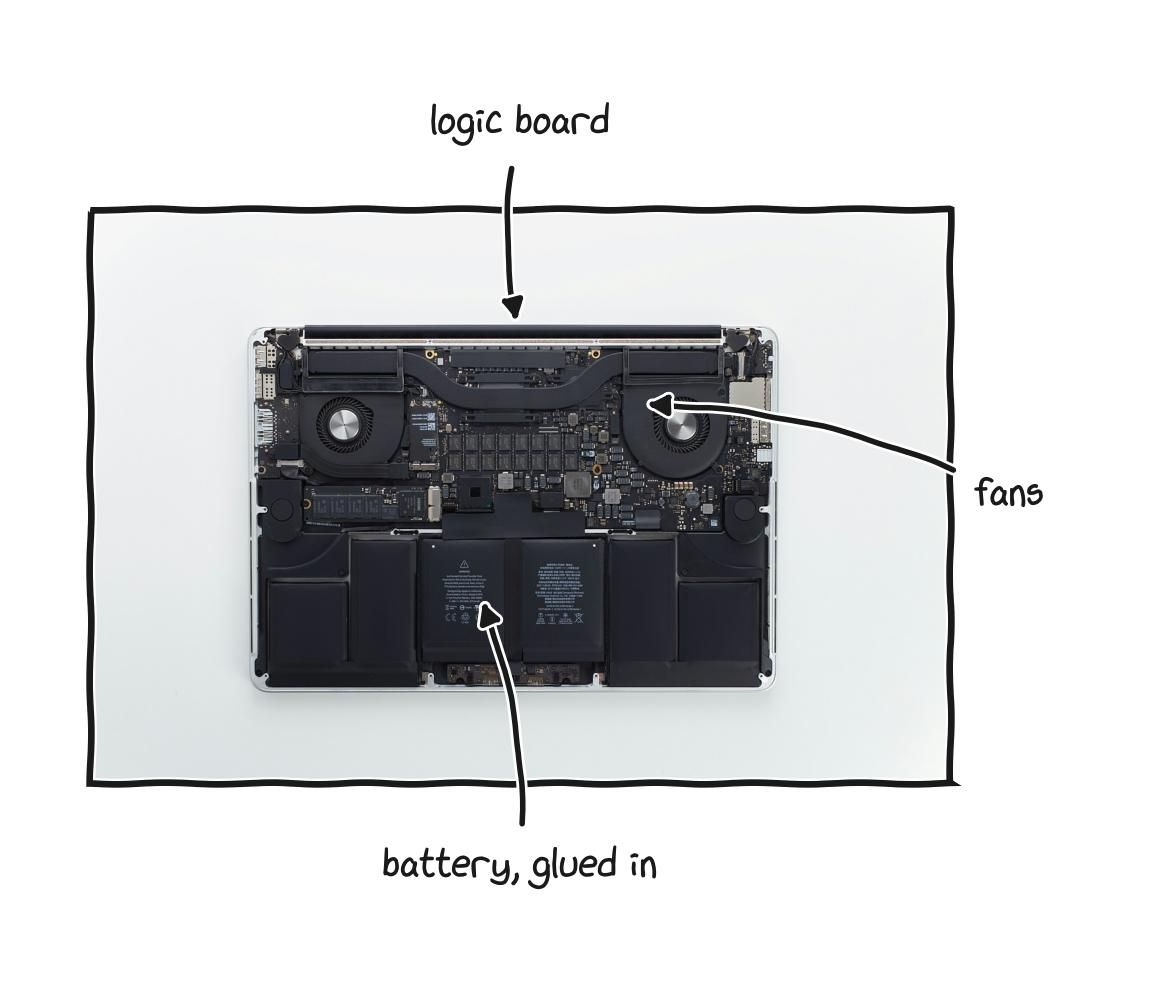
Sleek outside and sealed inside, thin designs glue and solder parts that used to unclip.
The Apple ecosystem is the clearest consumer scale version of this, which is why it draws so much attention. The hardware is genuinely excellent, and that is not in dispute, but the model is built around closure at every layer. Memory and storage are soldered, so the configuration you buy on day one is permanent, which pushes you toward overbuying. Parts pairing ties components to specific machines, so a genuine part swapped from another unit triggers warnings or loses function. Repairs route through the company, and out of warranty repair quotes are often high enough that replacement looks rational. The operating system runs only on the company’s hardware, and the hardware increasingly resists running anything else. Each individual choice has a defensible justification, and the sum is a machine you hold more than you own, where the economically rational move at every failure point is to give the company more money. The products are not bad. But excellence and ownership are different axes, and a product can score high on one and low on the other, and you should evaluate both.
The pattern reaches beyond consumer gadgets into more important machines, where the stakes change but the mechanism is identical. Some medical device makers build ventilators that use parts pairing, so after a hospital technician replaces a component the machine will not fully accept the new part until a cryptographic check confirms an authorized technician certified the repair, and during the COVID-19 lockdowns, when ventilators were urgently needed and travel was restricted, that lock did not adjust for the emergency. The dependence runs up to governments: when the International Criminal Court took an action the United States government opposed, the court lost access to its Microsoft services, including its email, and whether or not that was a coincidence as Microsoft has said, the situation is the lesson, since the basic ability of an international court to function turned out to depend on a single company in another country that could be subjected to political pressure. A government office, a hospital, or a court that runs on software it cannot inspect, cannot replace, and does not control has handed a piece of its independence to whoever controls that software. The same design choice that makes a blender disposable makes a ventilator dependent on a distant technician and an institution dependent on a distant company. Only the stakes change.
A newer twist is turning hardware you already paid for into a subscription. Carmakers have offered features like automatic high beam dimming or the full acceleration of an engine that is already installed as recurring monthly payments, where the capability sits in the car at the time of sale and whether it works is a decision the manufacturer keeps making, month after month, after the money has changed hands. The same logic, software gating capability you own, is spreading across categories.
What turns these inconveniences into something harder to escape is the law. In the United States, Section 1201 of the Digital Millennium Copyright Act, passed in 1998, makes it a crime to bypass a digital lock that controls access to a copyrighted work, and because software counts as a copyrighted work, the software inside almost every modern device counts too, with penalties reaching five years in prison and a five hundred thousand dollar fine for a first offense. What matters most is that the law applies whether or not the underlying action is otherwise legal, so modifying a device you own, replacing a paired part, or studying a device to find and report a security flaw can all run into this law, because each involves getting around a manufacturer’s lock, and the act of getting around the lock is itself the offense. The practical result is that a manufacturer can add the flimsiest software check to a product and have it backed by criminal law, without needing to win any argument about whether its repair restrictions are fair. The Copyright Office does grant and renew narrow repair exemptions every three years, which is how, for instance, tractor repair became legal, but the underlying obstacle remains, and because many other countries passed equivalent laws, often because a trade agreement required them to, the same structure exists across most of the world’s economies.
The good news is that the ground is moving, and faster than it has in years. As of the start of 2026, broad right to repair laws are in force in California, Colorado, Minnesota, New York, Oregon, and Washington, requiring manufacturers of consumer electronics and other covered products to make parts, tools, documentation, and diagnostic software available to owners and independent shops on fair and reasonable terms, with more states taking effect later in the year and dozens of new bills introduced in the first weeks of January alone. Oregon’s law was the first to ban parts pairing outright, in direct defiance of Apple’s lobbying, and the newer bills increasingly include anti parts pairing provisions and requirements that repair tools work offline. On the farm equipment side, federal regulators and state attorneys general sued John Deere in early 2025 over its repair restrictions, a court let the case proceed, and in 2026 Deere settled a related class action for ninety nine million dollars while agreeing to make diagnostic and repair tools available to farmers and independent shops for a decade, and a federal bill aimed specifically at agricultural repair has been introduced. None of this is finished, and the federal lock under Section 1201 remains, but the direction has reversed from where it sat only a few years ago.
Beyond principle, the case is concrete. A laptop you can repair and upgrade lasts longer, and a laptop that lasts longer is cheaper per year even if it costs more up front, since a replacement battery is a small cost and a replacement laptop is a large one. And the waste is enormous. The world generated about sixty two million tonnes of electronic waste in 2022, up by more than eighty percent since 2010, while less than a quarter of it was formally collected and recycled, and the total is on track to reach eighty two million tonnes by 2030, with e-waste rising roughly five times faster than documented recycling. Tens of billions of dollars of recoverable materials are lost, and a large share of that waste is devices thrown away not because they stopped working but because one small part failed and could not be replaced. The most environmentally friendly thing you can do with a computer is keep using the one you have for longer, and repairability is what makes that possible. The drivers of the problem, in the words of the people who measure it, include shorter product lifespans and products becoming harder to repair, which is to say the problem is largely a design choice, and design choices can be made differently.
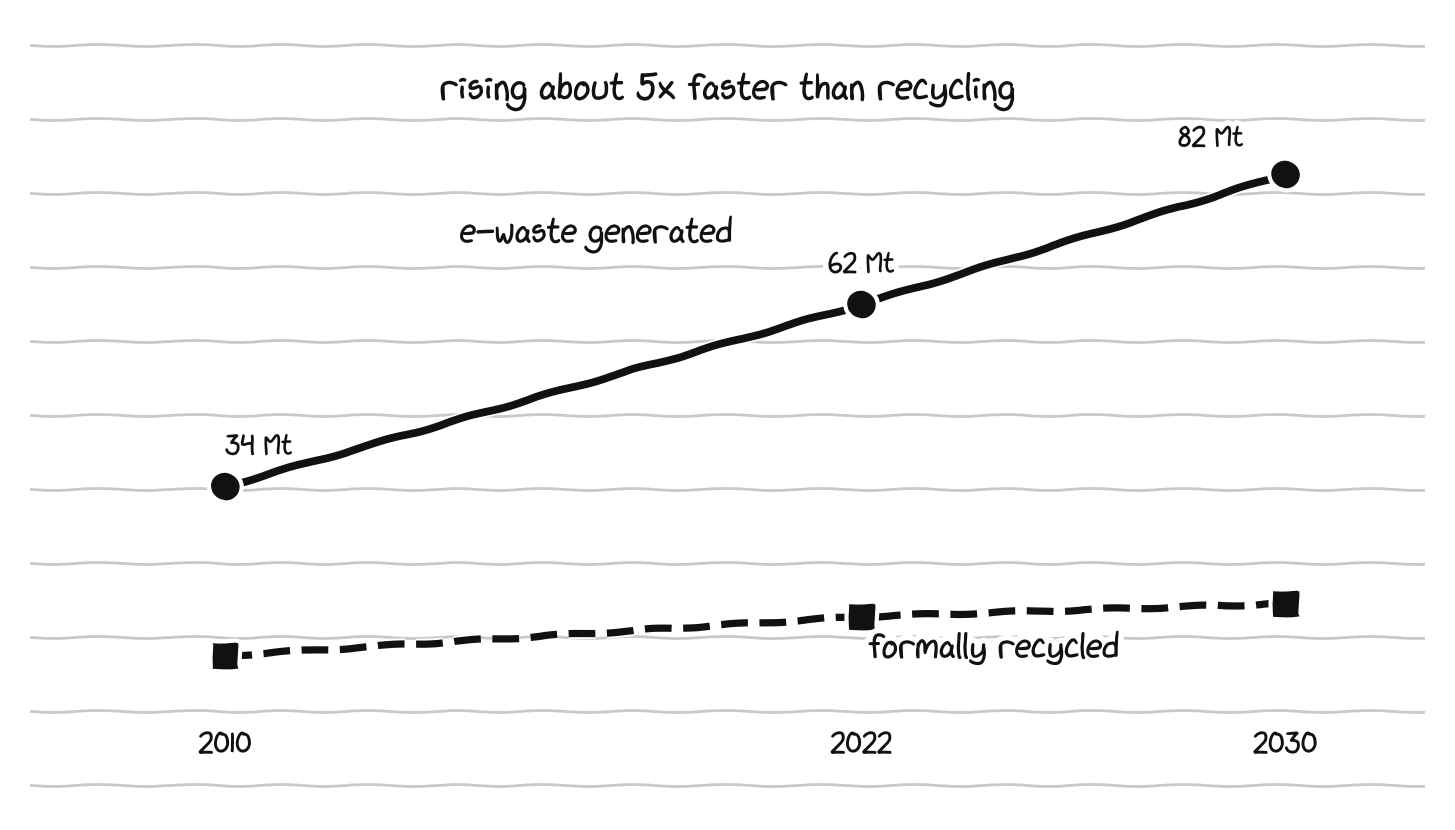
E-waste is rising about five times faster than documented recycling.
part 13: why understanding the machine matters
All of this is consumer advice, but it is more than that. For anyone who wants real depth in computer science, and especially for anyone aiming at machine learning, understanding the machine at this level is increasingly what separates people who can build serious systems from people who can only use them.
The standard story a student is told is that you can work at a high level of abstraction and ignore the layers beneath, that the compiler, the operating system, the libraries, and the hardware will take care of themselves. That story is mostly true right up until it badly is not, and the place it breaks is exactly where the interesting work lives. Abstractions leak. The reason a program is slow is almost never visible at the level the program is written, because it lives in the cache misses, the memory bandwidth, the way data is laid out, the synchronization between cores, the round trips to storage, all the things this guide has been describing. The people who can reason about those layers are the people who can make a system ten times faster, and that ability does not come from a framework. It comes from understanding what the machine is actually doing.
This has always mattered to some degree, but in AI it is no longer optional, because in AI the hardware is the constraint in a way it has not been for most of the history of software. The performance of a large model is set by memory bandwidth and interconnect speed and the precision of the arithmetic and how well the work is mapped onto the parallel hardware, which are all things from earlier in this guide. The famous scaling laws are statements about the relationship between compute, data, and model size, which is to say statements about hardware economics. The reason a model feels forgetful is a memory hierarchy fact. The reason a frontier model needs thousands of chips is that it does not fit in one chip’s memory, and the reason those chips spend so much of their time waiting is the network between them. Every one of the field’s central problems, when you trace it down, ends at a physical constraint. A person who understands those constraints can see why a system is built the way it is, can predict where it will break, and can design around the limits instead of being surprised by them. A person who does not is left treating the machine as a mystery that occasionally misbehaves.
There is a quieter benefit: understanding the layers tells you honestly what is actually hard. A great deal of what looks like magic in modern computing is simple ideas executed at enormous speed and scale, and seeing that clearly is its own kind of confidence. The processor is a fast simple loop. A neural network is matrix multiplication. The memory hierarchy is a series of trade offs between speed and size. Open source is a published recipe. None of these is beyond an ordinary person’s understanding, and holding them all at once turns the whole machine from a wall of intimidating words into a structure you can reason about. That is the difference between using technology as something handed down from above and understanding it as a human made thing, with human choices and human alternatives behind every layer. That is also, in the most literal sense, what owning your machine actually means.
You do not have to become a chip designer or a kernel developer to get most of this benefit, just as you do not have to rebuild a car engine to understand how one works well enough to not get cheated at the garage. The point is that the understanding is available, that it compounds, and that in a field defined more and more by physical constraints, the people who reach for it have a real and growing advantage over the people who do not.
part 14: how it should be, and what one person can do
Put the reality and the alternative side by side and the shape of a healthier technology world becomes clear. The five freedoms that define ownership of a single device generalize to technology as a whole. Equipment should be usable for any purpose its owner chooses, repairable with parts and information available to ordinary people and independent shops, upgradeable where that is reasonable, modifiable so the software it runs is a choice the owner makes, and understandable so that an owner, or someone the owner hires, can find out how it works. None of this requires that every owner become an engineer. Most people will never replace a tractor’s firmware or design a circuit board, just as most people never rebuild a car engine. Everyone should be allowed to do the work, or to pay someone who can, without asking the manufacturer’s permission and without breaking the law, because a right that only experts exercise is still worth having, since its existence keeps the manufacturer honest toward everyone else.
When you buy any piece of technology, a few questions separate a product that respects ownership from one that does not, and you can usually answer them before spending anything. Does the manufacturer sell individual replacement parts, so a battery or screen or worn component can be bought on its own, and if not, treat the product as close to disposable. Do repair guides exist, from the manufacturer or from independent sites that publish teardowns and repairability scores. Is anything important soldered or sealed in a way that makes future upgrades or repairs impossible, especially the memory, the storage, and the battery. Can the software be changed, or is the device locked to one company’s operating system and services. And is there public documentation of how the thing actually works. A product that answers these well will usually last longer, cost less over its life, and stay under the control of the person who paid for it.
For a computer specifically, the same thinking turns into a calm process. Decide first what the machine will honestly be used for over the next several years, since most regret comes from buying for an imagined use rather than a real one, and remember that web browsing, writing, office work, and learning to program lead to a very different machine, and a very different budget, than modern gaming or professional video work. Turn those needs into rough targets for processing power, memory, storage, and screen, leaning toward more memory if you do anything demanding and remembering that if you are learning machine learning you very likely want generous memory and cloud GPUs rather than a discrete GPU in the laptop. Then check the ownership questions the specification sheet tends to hide: whether the memory and storage can be replaced, whether the battery can be changed without unreasonable effort, whether parts are sold, and whether repair guides exist. Decide on the operating system on purpose rather than by default, and if you are drawn to Linux, either buy a machine that offers it preinstalled and supported, from one of the companies that specialize in that, or buy any well supported machine and install a distribution yourself, confirming first that any software essential to you actually runs on your choice. Weigh openness and repairability as real factors next to price and performance and weight, rather than ignoring them because no one ever explained that they were options. And verify with independent sources before buying, looking up the specific processor on a benchmark site and reading two or three reviews of the exact model, mainly for red flags, since the same chip can run faster or slower depending on how well a particular machine handles its heat.
The companies that exist today are not going to be toppled by any single purchase, and it is more honest to say that plainly than to pretend otherwise. But the direction of a market is made of many small signals, and those signals are not fixed in advance. Every time buyers reward repairability, sold parts, open documentation, changeable software, and products that are not locked down, the incentives shift a little in a better direction, and every time buyers reward sealed, locked, disposable design because it looks slightly thinner or shinier, the incentives shift the other way. No single choice decides the outcome, but the sum of the choices does, and the same is true of the deeper layers, the open instruction set slowly maturing, the open standards challenging the moats, the few companies choosing against their own short term interest to let the people who buy their products understand and repair them.
Something changes when you understand your own machine. You stop being a consumer of a sealed object you take on faith and become the owner of an understood tool. A specification sheet stops being a wall of intimidating words and becomes a short, readable description of a few parts doing a few jobs. A sales pitch stops being persuasive noise and becomes a set of claims you can check. The difference between a machine that lasts three years and one that lasts eight stops being luck and becomes something you can see in advance, in whether the memory is soldered and whether the battery can be replaced. And the strange facts about the AI era, why memory is the bottleneck, why a model needs thousands of chips, why one company’s software became a moat, why your phone won’t take a genuine part, stop being noise and start being consequences of a structure you can reason about. None of this asks you to join a movement or pick up a screwdriver. It asks only that openness, repairability, and understanding be treated as real values worth caring about, and that the difference between holding a piece of technology and owning it be visible to the person deciding where the money goes. Buy the machine. But understand it, and own it too.
Citations and References used:
A short reading list rather than inline citations, in case you want to check or learn more:
• Memory and bandwidth: JEDEC DDR5 specifications; DDR5-vs-DDR4 analyses.
• High bandwidth memory: JEDEC HBM3E and HBM4 (JESD270-4, 2024); NVIDIA Rubin and AMD MI400 roadmaps.
• Memory wall and roofline: the roofline performance model; memory-bound LLM decode.
• Mixed precision and tensor cores: NVIDIA architecture docs (FP32, TF32, FP16/BF16, FP8, FP4); Blackwell microbenchmarks.
• Scaling laws: Hoffmann et al., Chinchilla, 2022.
• AI and operating systems: Zhao et al., arXiv 2407.14567.
• RISC-V: RISC-V International figures; 2025-2026 data-center and laptop reporting.
• Open hardware: Framework design docs; Open Compute Project; Arduino; KiCad.
• Right to repair: DMCA Section 1201 exemptions; 2025-2026 state laws; Oregon parts-pairing ban; FTC v. John Deere (2026 settlement).
• E-waste: UN Global E-waste Monitor 2024.